Run Concurrent program without Using SRS Window Part2

Step3:
Add the function to Menu.
Copy the User Function Name and open the Menu’s form and attach the function to menu.

Run Concurrent program without Using SRS Window, askhareesh blog for Oracle Apps

 Save your changes and navigate to the responsibility.

Run Concurrent program without Using SRS Window, askhareesh blog for Oracle Apps


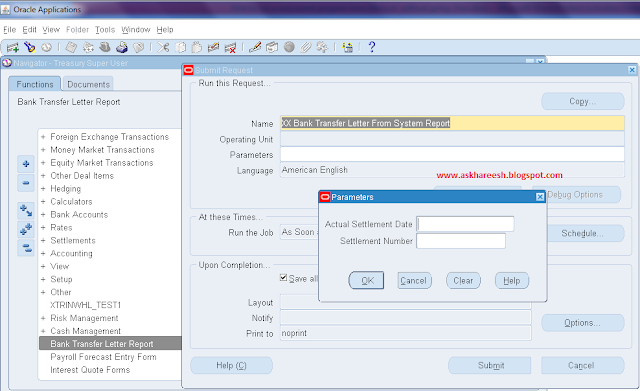
Double click on the prompt then SRS window with your concurrent program will pop up directly.

Run Concurrent program without Using SRS Window, askhareesh blog for Oracle Apps


Read Only Responsibility using Custom.pll in Oracle Applications

Read Only Responsibility using Custom.pll in Oracle Applications, www.askhareesh.com
Add the following code in Procedure Event for the Event Name WHEN-NEW-FORM-INSTANCE in Custom.pll. to make the responsibility of a user read-only. All you need to give/set the responsibility.


BEGIN
   IF EVENT_NAME = 'WHEN-NEW-FORM-INSTANCE'
   THEN
      --Responsibility ID
      IF FND_PROFILE.VALUE ('RESP_ID') = 12345
      THEN
         BEGIN
            COPY ('Entering app_form.query_only_mode.', 'global.frd_debug');
            --QUERY_ONLY="YES"
            COPY ('YES', 'PARAMETER.QUERY_ONLY');
            --Disabling the save and accept standard menus in form
            APP_MENU2.SET_PROP ('FILE.SAVE', ENABLED, PROPERTY_OFF);
            APP_MENU2.SET_PROP ('FILE.ACCEPT', ENABLED, PROPERTY_OFF);
            -- Get the current form
            FORM_NAME := NAME_IN ('system.current_form');
            --Get the current block
            BLOCK_NAME := GET_FORM_PROPERTY (FORM_NAME, FIRST_BLOCK);

            --loop to get all datablocks in current form
            WHILE (BLOCK_NAME IS NOT NULL)
            LOOP
               IF (GET_BLOCK_PROPERTY (BLOCK_NAME, BASE_TABLE) IS NOT NULL)
               THEN
                  --Set insert, update and delete not allowed
                  SET_BLOCK_PROPERTY (BLOCK_NAME,
                                      INSERT_ALLOWED,
                                      PROPERTY_FALSE);
                  SET_BLOCK_PROPERTY (BLOCK_NAME,
                                      UPDATE_ALLOWED,
                                      PROPERTY_FALSE);
                  SET_BLOCK_PROPERTY (BLOCK_NAME,
                                      DELETE_ALLOWED,
                                      PROPERTY_FALSE);
               END IF;

               BLOCK_NAME := GET_BLOCK_PROPERTY (BLOCK_NAME, NEXTBLOCK);
            END LOOP;
         END QUERY_ONLY_MODE;
      END IF;
   END IF;
END;

Also read : Oracle recommendation method to make read only responsibility
Also read : How to compile custom.pll in Oracle Apps R12

Read Only Responsibility in Oracle Apps

Standard/Oracle recommended solution:
  • Identify the menu that is attached to the your responsibility just like GL super user and Payables manager. 
  • Identify the form functions that are attached to the respective menu. 
  • Now create new form functions similar to the standard one but with the parameter QUERY_ONLY="YES" like below.
Navigation : System Administrator --> Application --> Function --> Form --> Parameter
Read Only Responsibility in Oracle Apps, www.askhareesh.com

This makes the function read only. 
  • Now create a new menu with these read-only functions and attach the menu to a new responsibility which is assigned to users who need to have read-only privileges.

Table registration API in Oracle Apps

Table registration API in Oracle Apps, www.askhareesh.com

DECLARE
   v_appl_short_name   VARCHAR2 (40) := '&appl_short_name';
   v_tab_name          VARCHAR2 (32) := '&table_name';
   v_tab_type          VARCHAR2 (50) := 'T';
   v_next_extent       NUMBER := 512;
   v_pct_free          NUMBER;
   v_pct_used          NUMBER;
BEGIN
   -- Unregistering the custom table if it exists
   ad_dd.delete_table (p_appl_short_name   => v_appl_short_name,
                       p_tab_name          => v_tab_name);

   -- Registering the custom table
   FOR i_tab_details IN (SELECT table_name,
                                tablespace_name,
                                pct_free,
                                pct_used,
                                ini_trans,
                                max_trans,
                                initial_extent,
                                next_extent
                           FROM dba_tables
                          WHERE table_name = v_tab_name)
   LOOP
      ad_dd.register_table (
         p_appl_short_name   => v_appl_short_name,
         p_tab_name          => i_tab_details.table_name,
         p_tab_type          => v_tab_type,
         p_next_extent       => NVL (i_tab_details.next_extent, 512),
         p_pct_free          => NVL (i_tab_details.pct_free, 10),
         p_pct_used          => NVL (i_tab_details.pct_used, 70));
   END LOOP;

   -- Registering the columns of our custom table
   FOR i_all_tab_cols IN (SELECT column_name,
                                 column_id,
                                 data_type,
                                 data_length,
                                 nullable
                            FROM all_tab_columns
                           WHERE table_name = v_tab_name)
   LOOP
      ad_dd.register_column (
         p_appl_short_name   => v_appl_short_name,
         p_tab_name          => v_tab_name,
         p_col_name          => i_all_tab_cols.column_name,
         p_col_seq           => i_all_tab_cols.column_id,
         p_col_type          => i_all_tab_cols.data_type,
         p_col_width         => i_all_tab_cols.data_length,
         p_nullable          => i_all_tab_cols.nullable,
         p_translate         => 'N',
         p_precision         => NULL,
         p_scale             => NULL);
   END LOOP;

   FOR all_keys IN (SELECT constraint_name, table_name, constraint_type
                      FROM all_constraints
                     WHERE constraint_type = 'P' AND table_name = v_tab_name)
   LOOP
      ad_dd.register_primary_key (
         p_appl_short_name   => v_appl_short_name,
         p_key_name          => all_keys.constraint_name,
         p_tab_name          => all_keys.table_name,
         p_description       => 'Register primary key',
         p_key_type          => 'S',
         p_audit_flag        => 'N',
         p_enabled_flag      => 'Y');

      FOR all_columns
         IN (SELECT column_name, position
               FROM dba_cons_columns
              WHERE table_name = all_keys.table_name
                    AND constraint_name = all_keys.constraint_name)
      LOOP
         ad_dd.register_primary_key_column (
            p_appl_short_name   => v_appl_short_name,
            p_key_name          => all_keys.constraint_name,
            p_tab_name          => all_keys.table_name,
            p_col_name          => all_columns.column_name,
            p_col_sequence      => all_columns.POSITION);
      END LOOP;
   END LOOP;

   COMMIT;
END;

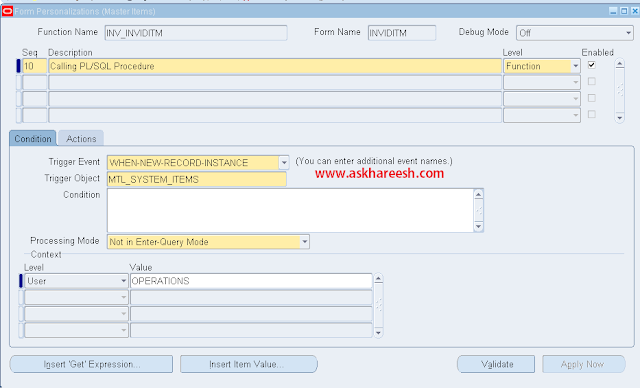
Form Personalization : Calling PL/SQL Procedure Part2

Enters details as below in condition tab.

Form Personalization : Calling PL/SQL Procedure

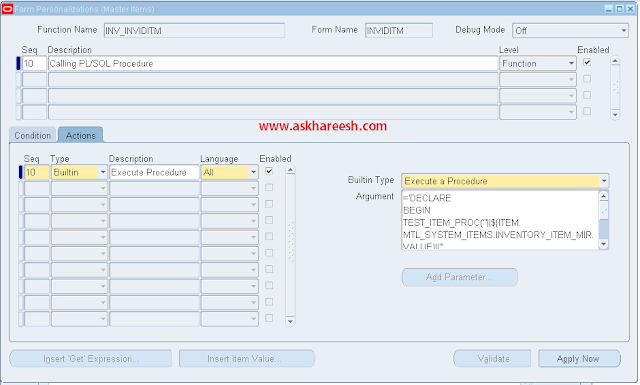
Navigate to Actions tab and enter the info as below.
Form Personalization : Calling PL/SQL Procedure

Argument to Copy:
='DECLARE
BEGIN
   TEST_ITEM_PROC (
      '''||${ITEM.MTL_SYSTEM_ITEMS.INVENTORY_ITEM_MIR.VALUE}||''',
      '''||${ITEM.MTL_SYSTEM_ITEMS.DESCRIPTION_MIR.VALUE}||''');
END '

Save the changes, reopen the form, create one item and test in the custom table.

Form Personalization : Calling PL/SQL Procedure


Form Personalization : Calling PL/SQL Procedure

Requirement is just like to insert item details in custom table along with in base table MTL_SYSTEM_ITEMS_B.

Table :
CREATE TABLE TEST_ITEM_TBL
(
   ITEM          VARCHAR2 (100),
   DESCRIPTION   VARCHAR2 (100)
);

Procedure:
CREATE OR REPLACE PROCEDURE TEST_ITEM_PROC (P_ITEM VARCHAR2, P_DESC VARCHAR2)
IS
   V_ITEM   VARCHAR2 (100);
BEGIN
   BEGIN
      SELECT ITEM
        INTO V_ITEM
        FROM TEST_ITEM_TBL
       WHERE ITEM = P_ITEM;
   EXCEPTION
      WHEN OTHERS
      THEN
         V_ITEM := NULL;
   END;

   IF V_ITEM IS NULL
   THEN
      INSERT INTO TEST_ITEM_TBL (ITEM, DESCRIPTION)
           VALUES (P_ITEM, P_DESC);
   END IF;

   COMMIT;
END TEST_ITEM_PROC;

Navigation: Inventory Vision Operations --> Items --> Master Items
Form Personalization : Calling PL/SQL Procedure

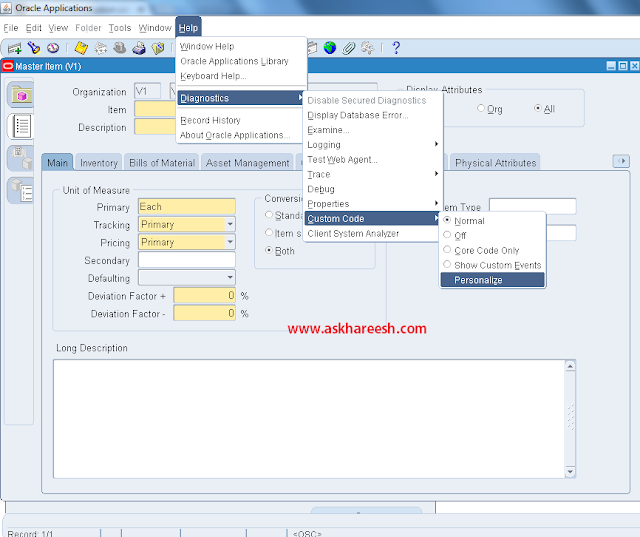
Navigation: Help --> Diagnostics --> Custom Code --> Personalize
Form Personalization : Calling PL/SQL Procedure


How To enable ZOOM button In Oracle Apps : Part2

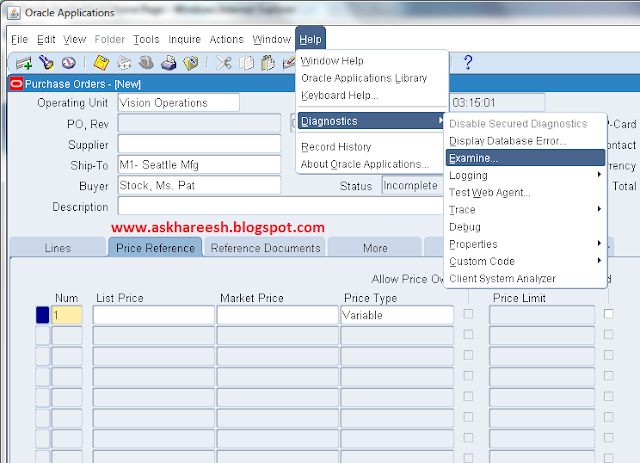
To know block and item name:

How To enable ZOOM trigger In Oracle Apps, askhareesh blog for Oracle Apps

Open CUSTOM.pll body using form builder.
How To enable ZOOM trigger In Oracle Apps, askhareesh blog for Oracle Apps

Replace the above code with below code.
How To enable ZOOM trigger In Oracle Apps, askhareesh blog for Oracle Apps

Code to Copy:
  form_name VARCHAR2(30):=NAME_IN('system.current_form');
  block_name VARCHAR2(30):=NAME_IN('system.current_block');
  item_name VARCHAR2(30):=NAME_IN('system.current_item');

BEGIN
   IF (    form_name = 'POXPOEPO'
       AND block_name = 'PO_LINES'
       AND item_name = 'MARKET_PRICE')
   THEN
      RETURN TRUE;
   ELSE
      RETURN FALSE;
   END IF;

Copy the CUSTOM.pll to resources path and compile.
Open the Purchase Orders form and move to Price reference tab -->
Market price to see the zoom button.
How To enable ZOOM trigger In Oracle Apps, askhareesh blog for Oracle Apps


FND_LOAD Commands Part3

FND_LOAD Commands, www.askhareesh.com
Concurrent Programs:

Source:

FNDLOAD apps/apps O Y DOWNLOAD $FND_TOP/patch/115/import/afcpprog.lct XXCPNAME.ldt PROGRAM APPLICATION_SHORT_NAME="PN" CONCURRENT_PROGRAM_NAME="XXCPNAME"

Target:

1. FNDLOAD apps/apps 0 Y UPLOAD @FND:patch/115/import/afcpprog.lct XXCPNAME.ldt

2. FNDLOAD apps/apps 0 Y UPLOAD_PARTIAL $FND_TOP/patch/115/import/afcpprog.lct XXCPNAME.ldt PROGRAM CONCURRENT_PROGRAM_NAME="XXCPNAME" APPLICATION_SHORT_NAME="PN"

Form Personalization:

Source:

FNDLOAD apps/apps 0 Y DOWNLOAD $FND_TOP/patch/115/import/affrmcus.lct XXFPNAME.ldt FND_FORM_CUSTOM_RULES function_name="XXFPNAME"

Target:

FNDLOAD apps/apps 0 Y UPLOAD $FND_TOP/patch/115/import/affrmcus.lct XXFPNAME.ldt

FND Users:

Source:

FNDLOAD apps/apps 0 Y DOWNLOAD $FND_TOP/patch/115/import/afscursp.lct ./XXUSERNAME.ldt FND_USER USER_NAME='XXUSERNAME'

Target:

FNDLOAD apps/apps 0 Y UPLOAD $FND_TOP/patch/115/import/afscursp.lct ./ XXUSERNAME.ldt

Printer Styles:

Source:

FNDLOAD apps/apps O Y DOWNLOAD $FND_TOP/patch/115/import/afcppstl.lct XXPRSTYLE.ldt STYLE PRINTER_STYLE_NAME="XXPRSTYLE"

Target:

FNDLOAD apps/apps 0 Y UPLOAD $FND_TOP/patch/115/import/afcppstl.lct XXPRSTYLE.ldt


Some useful Meta-link Notes related to FNDLOAD:

1. For NLS Language using FNDLOAD:

Note: 434724.1

2. Troubleshooting Incorrect translation with FNDLOAD

Note: 299080.1

Note:

1. Test FNDLOAD commands multiple times in multiple instances before running into PROD instances.

2. UPLOAD_PARTIAL is used to modify existed programs.

3. Execution sequence is important ex: To create a responsibility -> Create Form -> Create Function -> Create Menu -> Create Responsibility


Form Personalization - How to Change Field Name : Part2

Action Tab
Seq:- 10
Type:- Property
Description:- 
Language***:- All
Object Type:- Item
Target Object:- PERSON.HIRE_DATE (Search with string that we copied from step a)
Property Name:- PROMPT_TEXT
Value:- ABCD

 ***  Select 'All' to have the action processed for any language, or select a specific language.Generally text-related personalizations are applied for a specific language.

Form Personalization - How to Change Field Name, askHareesh blog for Oracle Apps

c) Validate the design and click on Apply Now.

Note1: Since we have selected processing mode as 'Both', hence the field name 'ABCD' will appear under both the condition 'New form is open' and  'Enter-Query Mode'.

If we select the processing mode as 'Only in Enter-Query Mode', then we will see the original name of the field while opening the form.Where as  if we query the form it will execute the trigger event and change the name of the field.
Form Personalization - How to Change Field Name, askHareesh blog for Oracle Apps


Form Personalization - How to Change Field Name, askHareesh blog for Oracle Apps

Note2: Each Rule consists of one or more Scope rows, and one or more Actions. If a Rule has no Scope rows or Action rows, it is not processed. Note that upon saving a Rule, if no Scope rows have been entered the form will automatically create a row at the Site level. If any scope matches the current runtime context then the Rule will be processed.

Important questions to be remembered by a Oracle Consultant Part3

Important questions to be remembered by a Oracle Consultant, www.askhareesh.com
Difference between Conversions and Interfaces?
Conversion is to bring the data from other (non-Ora Apps) system to Oracle-Application system. This is one time activity (bring account details, transactions, orders, receipts and so on. So conversion itself is a project.

Interfaces are Concurrent Programs/Program sets (pl/sql, pro*C, unix scripts, executables) . Interfaces are basically of two types (Oracle supplied (vanila programs eg: Auto invoice in AR) and created by developer).
Hope this clarifies the concepts.
Conversion means one time activity interface means periodic activity.
example:- to transfer the data old version to new version it is called conversion to transfer the data from staging table to interface table it is called interface , it is process on every day or every hour ........

Which module is not a multi org?
General Ledger and CRM Foundation Modules

What are the types of Concurrent Managers?Can we delete a Concurrent Manager?
There are many concurrent managers, each monitoring the flow within each apps area.
but there are 3 MASTER CONCURRENT MANAGERS:
1. Internal Concurent Manager (ICM): This is the one which monitors all other CMs
2. Standard Manager (SM) : This takes care of report running and batch jobs
3. Conflict Resolution Manager (CRM): checks concurrent program definitions for incompatability checks.
We cannot delete a concurrent manager... but we can disable it... but it's not recommended.

Trading community Architecture(TCA)
ICA (Internet Computing Architecture)

What are AP setup steps ?
setup---->suppliers....>invoices..>payments.....>reports......>periods.....>transfer to GL

What does US mean in appl_top/au/11.5.0/reports/US?
US is the language directory specifying that the source files to be placed under this dir is for English/American Language.

This is the standard of apps directory structure that for very language you implement oracle apps there should be a language specific folder

What are SQL CODE and SQL ERRM and why are they important for PL/SQL developers? 
SQL CODE returns the value of the error number for the last error encountered. The SQLERRM returns the actual error message for the last error encountered. They can be used in exception handling to report, or, store in an error log table, the error that occurred in the code. These are especially useful for the WHEN OTHERS exception.

What are the Back ground processes in Oracle and what are they?
There are basically 9 Processes.They do the house keeping activities for the Oracle and are common in any system.The various background processes in oracle are:

a) Data Base Writer(DBWR) :: Data Base Writer Writes Modified blocks from Database buffer cache to Data Files.This is required since the data is not written whenever a transaction is committed.

b) LogWriter(LGWR) :: Log Writer writes the redo log entries to disk. Redo Log data is generated in redo log buffer of SGA. As transaction commits and log buffer fills, LGWR writes log entries into a online redo log file.

c) System Monitor(SMON) :: The System Monitor performs instance recovery at instance start up.This is useful for recovery from system failure.

d) Process Monitor(PMON) :: The Process Monitor peforms process recovery when user Process fails. Pmon Clears and Frees resources that process was using.

e) CheckPoint(CKPT) :: At Specified times, all modified database buffers in SGA are written to data files by DBWR at Checkpoints and Updating all data files and control files of database to indicate the most recent checkpoint.

f) Archieves(ARCH) :: The Archiver copies online redo log files to archival storal when they are busy.

g) Recoveror(RECO) :: The Recoveror is used to resolve the distributed transaction in network.

h) Dispatcher (Dnnn) :: The Dispatcher is useful in Multi Threaded Architecture.

i)  Lckn :: We can have upto 10 lock processes for inter instance locking in parallel sql.

How many types of Sql Statements are there in Oracle?
There are basically 6 types of sql statments.They are
a) Data Definition Language(DDL) :: The DDL statments define and maintain objects and drop objects.

b) Data Manipulation Language(DML) :: The DML statements manipulate database data.

c) Transaction Control Statements :: Manage change by DML

d) Session Control :: Used to control the properties of current session enabling and disabling roles and changing .e.g, Alter Statements,Set Role

e) System Control Statements :: Change Properties of Oracle Instance .e.g, Alter System.

f) Embedded Sql :: Incorporate DDL, DML and T.C.S in Programming Language.e.g, Using the Sql Statements in languages such as 'C', Open,Fetch, execute and close

What is a Transaction in Oracle?
A transaction is a Logical unit of work that compromises one or more SQL Statements executed by a single User. According to ANSI, a transaction begins with first executable statement and ends when it is explicitly committed or rolled back.

Key Words Used in Oracle?
The Key words that are used in Oracle are ::
a) Commiting :: A transaction is said to be commited when the transaction makes permanent changes resulting from the SQL statements.

b) Rollback :: A transaction that retracts any of the changes resulting from SQL statements in Transaction.

c) SavePoint :: For long transactions that contain many SQL statements, intermediate markers or savepoints are declared. Savepoints can be used to divide a transactino into smaller points.

d) Rolling Forward :: Process of applying redo log during recovery is called rolling forward.

e) Cursor :: A cursor is a handle ( name or a pointer) for the memory associated with a specific stament. A cursor is basically an area allocated by Oracle for executing the Sql Statement. Oracle uses an implicit cursor statement for Single row query and Uses Explcit cursor for a multi row query.

f) System Global Area(SGA) :: The SGA is a shared memory region allocated by the Oracle that contains Data and control information for one Oracle Instance.It consists of Database Buffer Cache and Redo log Buffer.

g) Program Global Area (PGA) :: The PGA is a memory buffer that contains data and control information for server process.

g) Database Buffer Cache :: Database Buffer of SGA stores the most recently used blocks of database data.The set of database buffers in an instance is called Database Buffer Cache.

h) Redo log Buffer :: Redo log Buffer of SGA stores all the redo log entries.

i) Redo Log Files :: Redo log files are set of files that protect altered database data in memory that has not been written to Data Files. They are basically used for backup when a database crashes.

j) Process :: A Process is a 'thread of control' or mechansim in Operating System that executes series of steps.

What are Procedure,functions and Packages?
* Procedures and functions consist of set of PL/SQL statements that are grouped together as a unit to solve a specific problem or perform set of related tasks.
* Procedures do not Return values while Functions return one One Value
*Packages :: Packages Provide a method of encapsulating and storing related procedures, functions, variables and other Package Contents

What are Database Triggers and Stored Procedures?
Database Triggers :: Database Triggers are Procedures that are automatically executed as a result of insert in, update to, or delete from table. Database triggers have the values old and new to denote the old value in the table before it is deleted and the new indicated the new value that will be used. DT are useful for implementing complex business rules which cannot be enforced using the integrity rules.We can have the trigger as Before trigger or After Trigger and at Statement or Row level.

e.g:: operations insert,update ,delete 3
before ,after 3*2 A total of 6 combinations

At statement level(once for the trigger) or row level( for every execution ) 6 * 2 A total of 12.

Thus a total of 12 combinations are there and the restriction of usage of 12 triggers has been lifted from Oracle 7.3 Onwards.

Stored Procedures :: Stored Procedures are Procedures that are stored in Compiled form in the database.The advantage of using the stored procedures is that many users can use the same procedure in compiled and ready to use format.

How many Integrity Rules are there and what are they?
There are Three Integrity Rules. They are as follows ::
a) Entity Integrity Rule :: The Entity Integrity Rule enforces that the Primary key cannot be Null

b) Foreign Key Integrity Rule :: The FKIR denotes that the relationship between the foreign key and the primary key has to be enforced.When there is data in Child Tables the Master tables cannot be deleted.

c) Business Integrity Rules :: The Third Intigrity rule is about the complex business processes which cannot be implemented by the above 2 rules.

What are the Various Master and Detail Relation ships?
The various Master and Detail Relationship are

a) Non Isolated :: The Master cannot be deleted when a child is existing
b) Isolated :: The Master can be deleted when the child is existing
c) Cascading :: The child gets deleted when the Master is deleted.

What are the Various Block Coordination Properties?
The various Block Coordination Properties are

a) Immediate
Default Setting. The Detail records are shown when the Master Record are shown.

b) Defferred with Auto Query
Oracle Forms defer fetching the detail records until the operator navigates to the detail block.

c) Defferred with No Auto Query
The operator must navigate to the detail block and explicitly execute a query

What are the Different Optimization Techniques?
The Various Optimization techniques are

a) Execute Plan :: we can see the plan of the query and change it accordingly based on the indexes

b) Optimizer_hint ::
set_item_property('DeptBlock',OPTIMIZER_HINT,'FIRST_ROWS');
Select /*+ First_Rows */ Deptno,Dname,Loc,Rowid from dept
where (Deptno > 25)

c) Optimize_Sql ::
By setting the Optimize_Sql = No, Oracle Forms assigns a single cursor for all SQL statements.This slow downs the processing because for evertime the SQL must be parsed whenever they are executed.
f45run module = my_firstform userid = scott/tiger optimize_sql = No

d) Optimize_Tp ::
By setting the Optimize_Tp= No, Oracle Forms assigns seperate cursor only for each query SELECT statement. All other SQL statements reuse the cursor.
f45run module = my_firstform userid = scott/tiger optimize_Tp = No

Restrict '&' in Sql*Plus
sql> set define off
This will restrict the use of '&' in the sql*plus for that particular session


Creating LDT files in Oracle Apps : Part2

Creating LDT files in Oracle Apps, www.askhareesh.com
Menus:

SOURCE:
FNDLOAD apps/apps O Y DOWNLOAD $FND_TOP/patch/115/import/afsload.lct XXMNNAME.ldt MENU MENU_NAME="XXMNNAME"

Target:
FNDLOAD apps/apps 0 Y UPLOAD @FND:patch/115/import/afsload.lct XXMNNAME.ldt

Responsibilities:

SOURCE:
FNDLOAD apps/apps O Y DOWNLOAD $FND_TOP/patch/115/import/afscursp.lct XXRESNAME.ldt FND_RESPONSIBILITY RESP_KEY="XXRESNAME"

Target:
1. FNDLOAD apps/apps O Y UPLOAD $FND_TOP/patch/115/import/afscursp.lct XXRESNAME.ldt

2.FNDLOAD apps/apps 0 Y UPLOAD_PARTIAL $FND_TOP/patch/115/import/afscursp.lct XXRESNAME.ldt FND_RESPONSIBILITY RESP_KEY="XXRESNAME" APPLICATION_SHORT_NAME="PN"

Request Groups:


SOURCE:
FNDLOAD apps/apps O Y DOWNLOAD $FND_TOP/patch/115/import/afcpreqg.lct XXRQGNAME.ldt REQUEST_GROUP REQUEST_GROUP_NAME="XXRQGNAME" APPLICATION_SHORT_NAME="PN"

Target:
1.FNDLOAD apps/apps O Y UPLOAD $FND_TOP/patch/115/import/afcpreqg.lct XXRQGNAME.ldt

2.FNDLOAD apps/apps 0 Y UPLOAD_PARTIAL $FND_TOP/patch/115/import/afcpreqg.lct XXRQGNAME.ldt REQUEST_GROUP REQUEST_GROUP_NAME="XXRQGNAME" APPLICATION_SHORT_NAME="PN"

Request Sets:

SOURCE:
1.FNDLOAD apps/apps 0 Y DOWNLOAD $FND_TOP/patch/115/import/afcprset.lct XXRQSNAME.ldt REQ_SET REQUEST_SET_NAME="XXRQSNAME"

2.FNDLOAD apps/apps 0 Y DOWNLOAD $FND_TOP/patch/115/import/afcprset.lct XXRQSLNAME.ldt REQ_SET_LINKS REQUEST_SET_NAME="XXRQSNAME"

Target:
1.FNDLOAD apps/apps 0 Y UPLOAD $FND_TOP/patch/115/import/afcprset.lct XXRQSNAME.ldt

2.FNDLOAD apps/apps 0 Y UPLOAD $FND_TOP/patch/115/import/afcprset.lct XXRQSLNAME.ldt

Lookups:

SOURCE:
FNDLOAD apps/apps O Y DOWNLOAD $FND_TOP/patch/115/import/aflvmlu.lct XXLKPNAME.ldt FND_LOOKUP_TYPE APPLICATION_SHORT_NAME="PN" LOOKUP_TYPE="XXLKPNAME"

Target:
1.FNDLOAD apps/apps 0 Y UPLOAD aflvmlu.lct XXLKPNAME.ldt

2.FNDLOAD apps/apps 0 Y UPLOAD_PARTIAL $FND_TOP/patch/115/import/aflvmlu.lct XXLKPNAME.ldt FND_LOOKUP_TYPE LOOKUP_TYPE="XXLKPNAME" APPLICATION_SHORT_NAME="PN"

Value sets:

SOURCE:
FNDLOAD apps/apps O Y DOWNLOAD $FND_TOP/patch/115/import/afffload.lct XXVALSNAME.ldt VALUE_SET FLEX_VALUE_SET_NAME="XXVALSNAME"

Target:
1.FNDLOAD apps/apps 0 Y UPLOAD afffload.lct XXVALSNAME.ldt

2.FNDLOAD apps/apps 0 Y UPLOAD_PARTIAL $FND_TOP/patch/115/import/afffload.lct XXVALSNAME.ldt VALUE_SET FLEX_VALUE_SET_NAME="XXVALSNAME" APPLICATION_SHORT_NAME="PN"

Descriptive Flex-fields:

SOURCE:
FNDLOAD apps/apps O Y DOWNLOAD $FND_TOP/patch/115/import/afffload.lct XXDFFNAME.ldt DESC_FLEX P_LEVEL='COL_ALL:REF_ALL:CTX_ONE:SEG_ALL' APPLICATION_SHORT_NAME="PN"

DESCRIPTIVE_FLEXFIELD_NAME="PN_LEASE_DETAILS" P_CONTEXT_CODE="Global Data Elements"

Target:
FNDLOAD apps/apps 0 Y UPLOAD @FND:patch/115/import/afffload.lct XXDFFNAME.ldt

Key Flex-fields:

SOURCE:
FNDLOAD apps/apps O Y DOWNLOAD $FND_TOP/patch/115/import/afffload.lct XXKFFNAME.ldt KEY_FLEX P_LEVEL=’COL_ALL:FQL_ALL:SQL_ALL:STR_ONE:WFP_ALL:SHA_ALL:CVR_ALL:SEG_ALL’

APPLICATION_SHORT_NAME="FND" ID_FLEX_CODE="key flex code" P_STRUCTURE_CODE="structure name"

Target:
FNDLOAD apps/apps 0 Y UPLOAD @FND:patch/115/import/afffload.lct XXKFFNAME.ldt

Concurrent Programs:

SOURCE:
FNDLOAD apps/apps O Y DOWNLOAD $FND_TOP/patch/115/import/afcpprog.lct XXCPNAME.ldt PROGRAM APPLICATION_SHORT_NAME="PN" CONCURRENT_PROGRAM_NAME="XXCPNAME"

Target:
1.FNDLOAD apps/apps 0 Y UPLOAD @FND:patch/115/import/afcpprog.lct XXCPNAME.ldt

2.FNDLOAD apps/apps 0 Y UPLOAD_PARTIAL $FND_TOP/patch/115/import/afcpprog.lct XXCPNAME.ldt PROGRAM CONCURRENT_PROGRAM_NAME="XXCPNAME" APPLICATION_SHORT_NAME="PN"

Form Personalization:

SOURCE:
FNDLOAD apps/apps 0 Y DOWNLOAD $FND_TOP/patch/115/import/affrmcus.lct XXFPNAME.ldt FND_FORM_CUSTOM_RULES function_name="XXFPNAME"

Target:
FNDLOAD apps/apps 0 Y UPLOAD $FND_TOP/patch/115/import/affrmcus.lct XXFPNAME.ldt

FND Users:

SOURCE:
FNDLOAD apps/apps 0 Y DOWNLOAD $FND_TOP/patch/115/import/afscursp.lct ./XXUSERNAME.ldt FND_USER USER_NAME='XXUSERNAME'

Target:
FNDLOAD apps/apps 0 Y UPLOAD $FND_TOP/patch/115/import/afscursp.lct ./ XXUSERNAME.ldt

Alerts:

SOURCE:
FNDLOAD apps/apps 0 Y DOWNLOAD $ALR_TOP/patch/115/import/alr.lct XXALERTNAME.ldt ALR_ALERTS APPLICATION_SHORT_NAME=PER Alert_name="XXALERTNAME"

Target:
FNDLOAD apps/apps 0 Y UPLOAD $ALR_TOP/patch/115/import/alr.lct XXALERTNAME.ldt ALR_ALERTS APPLICATION_SHORT_NAME=PER Alert_name="XXALERTNAME"

Note : apps/apps is Database UserName/PassWord


Creating LDT files in Oracle Apps

Creating LDT files in Oracle Apps, www.askhareesh.com
  • LDT is a file extension for a data file used with Oracle  applications.
  • LDT stands for Loader DaTa files.
  • LDT files contain entity definitions, parent-child relationships, input parameters and data. LDT files to an LCT file which is used for the configuration.
  • LDT files can be exported from the Oracle database using the FNDLOAD function.
  • We can open and edit LDT files, but it is not a recommended way.
We can create LDT files for following things:
  1. PROFILE Options
  2. Forms
  3. FUNCTIONS
  4. Menus
  5. Responsibilities
  6. Request GROUPS
  7. Request SETS
  8. Lookups
  9. VALUE SETS
  10. Descriptive flex-FIELDS
  11. KEY flex-FIELDS
  12. Concurrent programs
  13. Form personalization
  14. FND USERS
  15. Alerts
Profile Options:

SOURCE:
FNDLOAD apps/apps O Y DOWNLOAD $FND_TOP/patch/115/import/afscprof.lct XXPRNAME.ldt
PROFILE PROFILE_NAME="XXPRNAME" APPLICATION_SHORT_NAME="PN"

Target:
FNDLOAD apps/apps O Y UPLOAD $FND_TOP/patch/115/import/afscprof.lct XXPRNAME.ldt
FNDLOAD apps/apps 0 Y UPLOAD_PARTIAL $FND_TOP/patch/115/import/afscprof.lct XXPRNAME.ldt PROFILE PROFILE_NAME=" XXPRNAME" APPLICATION_SHORT_NAME="PN"

Forms:

SOURCE:
FNDLOAD apps/apps O Y DOWNLOAD $FND_TOP/patch/115/import/afsload.lct XXFRMNAME.ldt FORM APPLICATION_SHORT_NAME="PN" FORM_NAME="XXFRMNAME"

Target:
FNDLOAD apps/apps 0 Y UPLOAD @FND:patch/115/import/afsload.lct XXFRMNAME.ldt

Functions:

SOURCE:
FNDLOAD apps/apps O Y DOWNLOAD $FND_TOP/patch/115/import/afsload.lct XXFUNNAME.ldt FUNCTION FUNC_APP_SHORT_NAME="PN" FUNCTION_NAME="XXFUNNAME"

Target:
FNDLOAD apps/apps O Y UPLOAD @FND:patch/115/import/afsload.lct XXFUNNAME.ldt

Note : apps/apps is Database UserName/PassWord


Oracle Purchasing Terminology

Oracle Purchasing Terminology, www.askhareesh.com
Terms used in the conventional purchasing system and as referred in Oracle Purchasing may be different. A brief explanation of the ‘Oracle Purchasing’ terms vis-à-vis the existing terminology is provided the following paragraphs. These terms are extensively used in documenting the ‘Purchasing - To Be’ flows and it is recommended that the various users of this system get acquainted with the same.

Requestor:
Any Employee who requires specific items to meet his operational needs. Requestor may or may not have the system access to enter the on-line requisitions. Requestor with no computer access will give their requisitions manually on pre-printed requisition form to the requisition ‘Preparer’ within the concerned department.

Preparer:
Employee in a department with the responsibility of entering Purchase Requisitions in the system.

Approver:
Employee with the responsibility and authority of approving the requisition and / or the Quotation Analysis Document and / or the Purchase Orders.

Buyer:
Employee in the Purchase Department with the responsibility of entering the Requests for Quotation, the Quotations received from the Supplier and the Purchase Orders in the new system.

Request For Quotation (RFQ):
Synonym for ‘Inquiry’. RFQs are sent to the vendors, requesting them for their quotations for the items / services required to be purchased.

Quotation:
Quotations are the ‘Vendor Offers’ for the required items / services.

Quotation Analysis:
It is a ‘Comparative Statement of Quotations’.

Standard Purchase Order:
Standard Purchase Orders are created for purchase of various items / services where details such as the quantity to be purchased and the negotiated costs.

Blanket Purchase Agreement:
Blanket purchase agreements are signed with the vendor for the supply of goods / services over a period. Such agreements can be used when details of the goods / services you plan to buy from a specific supplier in a period are known, but you do not yet know the details of your delivery schedules. They can also be used to specify negotiated prices for your items before actually buying them.

Blanket Release:
You can issue a Blanket Release against a Blanket Purchase Agreement to place the actual order with the vendor. The Releases should be within the Blanket Agreement effectivity dates.

Planned Purchase Order:
It is a long term agreement committing to buy items / services from a single source. The tentative delivery schedule is given to the vendor along with other details like quantities and estimated costs.

Schedule Release:
This document is issued to the vendor against a Planned Purchase Order to place the actual order. This document will confirm the specific quantity and delivery date to the vendor.

Contract Purchase Agreements:
Contract Purchase Agreements may be entered into with suppliers to agree on specific terms and conditions without indicating the goods or services that will actually be purchased. Standard Purchase Orders can be issued at a later date referencing such Contracts.

Purchasing Cycle:
Requisitions: Requisitions generated by various departments of your organization. They basically say that ‘I WANT THIS ITEM’ mentioning the item quantity and required date

Request for Quotation:
The purchasing person sends the requirement to various suppliers giving details of the item and can also specify own terms and conditions such as payment terms, price etc.

Quotations:
The Supplier responds to the RFQ and sends their quotations mentioning details of the item and all their terms and conditions regarding payment terms, discount, delivery schedules, etc.

Purchase Orders:
The quotations received from various suppliers are compared and PO made for them in which all the terms and conditions of the firm are mentioned as regards to Payment, price, etc.

Receiving Goods:
Suppliers ship the goods, which are received in your organization

Payments:
After clearance from the receiving department about the receipt of goods, payments are made to the suppliers.

Close the PO:
After the items are received, payments made you can close the PO.

Purchasing Requirements
  •  Item
  •  Quantity
  •  Ship to Address
  •  Bill to Address
  •  Delivery Schedules
  •  Terms and Conditions
  •  PO Numbering
  •  Approval Authority
  •  Supplier
  •  Accounts


How to call one form from another form using Personalization : Part 2

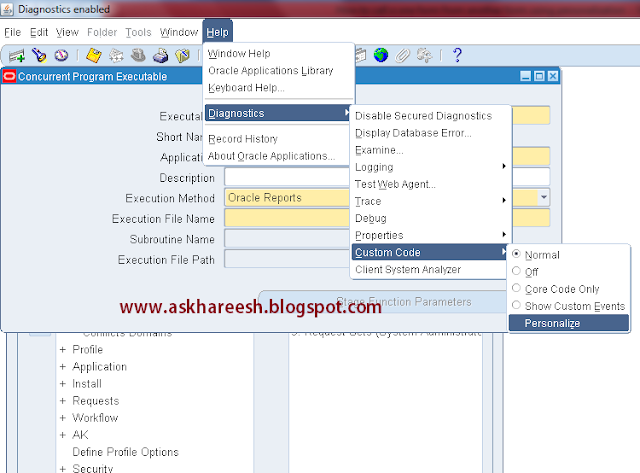
4) Open Executable form and go to personalization.


How to call one form from another form using Personalization, askhareesh blog on Oracle Applications


How to call one form from another form using Personalization, askhareesh blog on Oracle Applications


5) Set the global variable value in the default whare condition of block, call execuate_query and set null value to global variable at the end.


How to call one form from another form using Personalization, askhareesh blog on Oracle Applications


How to call one form from another form using Personalization, askhareesh blog on Oracle Applications


How to call one form from another form using Personalization, askhareesh blog on Oracle Applications


How to call one form from another form using Personalization, askhareesh blog on Oracle Applications

6) Save and close the form.

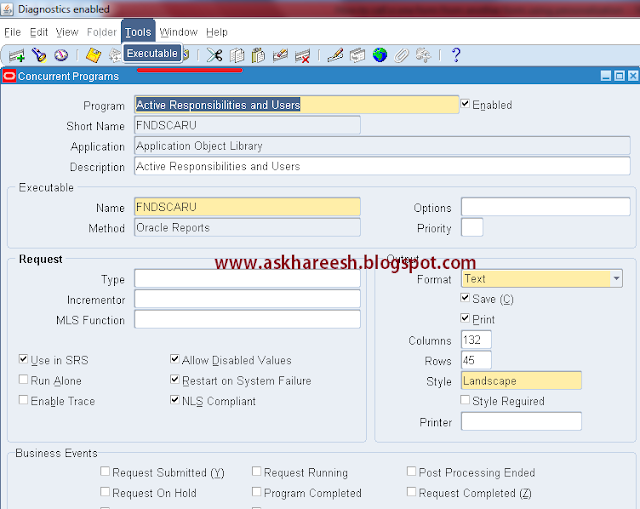
7) Now open the concurrent program form and try to query (CTRL+F11) and now click on tools --> Exceutable


How to call one form from another form using Personalization, askhareesh blog on Oracle Applications

Now you can see the respective execuatble.

How to call one form from another form using Personalization, askhareesh blog on Oracle Applications