Oracle Purchasing Terminology

Oracle Purchasing Terminology, www.askhareesh.com
Terms used in the conventional purchasing system and as referred in Oracle Purchasing may be different. A brief explanation of the ‘Oracle Purchasing’ terms vis-à-vis the existing terminology is provided the following paragraphs. These terms are extensively used in documenting the ‘Purchasing - To Be’ flows and it is recommended that the various users of this system get acquainted with the same.

Requestor:
Any Employee who requires specific items to meet his operational needs. Requestor may or may not have the system access to enter the on-line requisitions. Requestor with no computer access will give their requisitions manually on pre-printed requisition form to the requisition ‘Preparer’ within the concerned department.

Preparer:
Employee in a department with the responsibility of entering Purchase Requisitions in the system.

Approver:
Employee with the responsibility and authority of approving the requisition and / or the Quotation Analysis Document and / or the Purchase Orders.

Buyer:
Employee in the Purchase Department with the responsibility of entering the Requests for Quotation, the Quotations received from the Supplier and the Purchase Orders in the new system.

Request For Quotation (RFQ):
Synonym for ‘Inquiry’. RFQs are sent to the vendors, requesting them for their quotations for the items / services required to be purchased.

Quotation:
Quotations are the ‘Vendor Offers’ for the required items / services.

Quotation Analysis:
It is a ‘Comparative Statement of Quotations’.

Standard Purchase Order:
Standard Purchase Orders are created for purchase of various items / services where details such as the quantity to be purchased and the negotiated costs.

Blanket Purchase Agreement:
Blanket purchase agreements are signed with the vendor for the supply of goods / services over a period. Such agreements can be used when details of the goods / services you plan to buy from a specific supplier in a period are known, but you do not yet know the details of your delivery schedules. They can also be used to specify negotiated prices for your items before actually buying them.

Blanket Release:
You can issue a Blanket Release against a Blanket Purchase Agreement to place the actual order with the vendor. The Releases should be within the Blanket Agreement effectivity dates.

Planned Purchase Order:
It is a long term agreement committing to buy items / services from a single source. The tentative delivery schedule is given to the vendor along with other details like quantities and estimated costs.

Schedule Release:
This document is issued to the vendor against a Planned Purchase Order to place the actual order. This document will confirm the specific quantity and delivery date to the vendor.

Contract Purchase Agreements:
Contract Purchase Agreements may be entered into with suppliers to agree on specific terms and conditions without indicating the goods or services that will actually be purchased. Standard Purchase Orders can be issued at a later date referencing such Contracts.

Purchasing Cycle:
Requisitions: Requisitions generated by various departments of your organization. They basically say that ‘I WANT THIS ITEM’ mentioning the item quantity and required date

Request for Quotation:
The purchasing person sends the requirement to various suppliers giving details of the item and can also specify own terms and conditions such as payment terms, price etc.

Quotations:
The Supplier responds to the RFQ and sends their quotations mentioning details of the item and all their terms and conditions regarding payment terms, discount, delivery schedules, etc.

Purchase Orders:
The quotations received from various suppliers are compared and PO made for them in which all the terms and conditions of the firm are mentioned as regards to Payment, price, etc.

Receiving Goods:
Suppliers ship the goods, which are received in your organization

Payments:
After clearance from the receiving department about the receipt of goods, payments are made to the suppliers.

Close the PO:
After the items are received, payments made you can close the PO.

Purchasing Requirements
  •  Item
  •  Quantity
  •  Ship to Address
  •  Bill to Address
  •  Delivery Schedules
  •  Terms and Conditions
  •  PO Numbering
  •  Approval Authority
  •  Supplier
  •  Accounts


PL/SQL Script of Purchase Order Interface

Purchase Order Interface, AskHareesh.blogspot.com
PL/SQL Script to upload data from staging table to interface table


CREATE OR REPLACE PROCEDURE xxx_po_api
AS
---To Import data from Interface to Base Tables - Import Standard Purchase Orders
-- please do the following: to see the errors
-- Run the program - Purchasing Interface Errors Report
-- choose parameter : PO_DOCS_OPEN_INTERFACE
-- po_interface_errors
l_currency_code fnd_currencies_vl.currency_code%type;
l_verify_flag Char(1);
l_error_message varchar2(5000);
l_vendor_id po_vendors.vendor_id%type;
l_vendor_site_id po_vendor_sites_all.vendor_site_id%type;
l_ship_to hr_locations.location_id%type;
l_bill_to hr_locations.location_id%type;
l_inventory_item_id mtl_system_items_b.inventory_item_id%type;
l_legacy_ponum number(20):=0;
l_batch_id number(3);
CURSOR C_PO_HEADER IS
            select distinct legacy_ponum,
            currency_code,
            vendor_name,
            vendor_site_code,
            ship_to,
            bill_to,
            status
            from xxx_purchase_order_stg;

CURSOR C_PO_LINES(l_legacy_ponum NUMBER) IS
            select *
            from xxx_purchase_order_stg
            where trim(legacy_ponum) = trim(l_legacy_ponum);
BEGIN
    FOR H1 IN C_PO_HEADER LOOP
        l_verify_flag := 'Y' ;
        l_error_message := NULL;
        BEGIN
            select currency_code
            into l_currency_code
            from fnd_currencies_vl
            where enabled_flag = 'Y'
            and currency_flag = 'Y'
            and upper(currency_code) = upper(trim(H1.currency_code));
            EXCEPTION
            WHEN OTHERS THEN
            l_verify_flag := 'N' ;
            l_error_message := l_error_message||'Currency Code is not Valid...';
        END;
        BEGIN
            select vendor_id
            into l_vendor_id
            from po_vendors
            where upper(vendor_name) = upper(trim(H1.vendor_name)) ;
            EXCEPTION
            WHEN OTHERS THEN
            l_verify_flag := 'N' ;
            l_error_message := l_error_message||'Vendor is not Existing...';
        END;
        BEGIN
            select vendor_site_id
            into l_vendor_site_id
            from po_vendor_sites_all
            where vendor_id = l_vendor_id
            and vendor_site_code = upper(trim(H1.vendor_site_code)) ;
            EXCEPTION
            WHEN OTHERS THEN
            l_verify_flag := 'N' ;
            l_error_message := l_error_message||'Vendor Site is not Existing...';
        END;
        BEGIN
            select location_id
            into l_ship_to
            from hr_locations
            where location_code = upper(trim(H1.ship_to));
            EXCEPTION
            WHEN OTHERS THEN
            l_verify_flag := 'N' ;
            l_error_message := l_error_message||'Ship To Location is not Existing...';
        END;
        BEGIN
            select location_id
            into l_bill_to
            from hr_locations
            where location_code = upper(trim(H1.bill_to));
            EXCEPTION
            WHEN OTHERS THEN
            l_verify_flag := 'N' ;
            l_error_message := l_error_message||'Bill To Location is not Existing...';
        END;
        If H1.status = 'Approved' then
        l_batch_id := 100 ;
        elsif H1.status = 'Incomplete' then
        l_batch_id := 101 ;
        else
        l_verify_flag := 'N' ;
        l_error_message := l_error_message||'Status is not valid...';
        end if;
l_legacy_ponum := trim(H1.legacy_ponum) ;
        IF l_verify_flag <> 'N' THEN
            insert into po_headers_interface
            (interface_header_id,
            batch_id,
            action,
            document_type_code,
            currency_code,
            agent_id,
            vendor_id,
            vendor_site_id,
            ship_to_location_id,
            bill_to_location_id
            )
            values
            (po_headers_interface_s.nextval,
            l_batch_id,
            'ORIGINAL',
            'STANDARD',
            l_currency_code,
            5479,
            l_vendor_id,
            l_vendor_site_id,
            l_ship_to,
            l_bill_to );
            update xxx_purchase_order_stg
            set h_verify_flag = 'Y'
            where legacy_ponum = l_legacy_ponum;
            COMMIT;
    FOR L1 IN C_PO_LINES(l_legacy_ponum) LOOP
        BEGIN
            select inventory_item_id
            into l_inventory_item_id
            from mtl_system_items_b
            where segment1||'.'||segment2||'.'||segment3||'.'||segment4=L1.item
            and organization_id = (select inventory_organization_id
            from hr_locations
            where location_id = l_ship_to ) ;
            EXCEPTION
            WHEN OTHERS THEN
            l_verify_flag := 'N' ;
            l_error_message := l_error_message ||'Inventory Item is not Existing...';
        END;
        IF L1.unit_price IS NULL THEN
        l_verify_flag := 'N' ;
        l_error_message := l_error_message ||'Unit Price is not Existing...';
        ELSIF L1.quantity IS NULL THEN
        l_verify_flag := 'N' ;
        l_error_message := l_error_message ||'Quantity is not Existing...';
        ELSIF L1.need_by_date IS NULL THEN
        l_verify_flag := 'N' ;
        l_error_message := l_error_message ||'Need By Date is not Existing...';
        END IF;
        IF l_verify_flag <> 'N' THEN
            insert into po_lines_interface
            (interface_line_id,
            interface_header_id,
            action,
            line_num,
            item_id,
            unit_price,
            quantity,
            Need_By_Date)
            values
            (po_lines_interface_s.nextval,
            po_headers_interface_s.currval,
            'ORIGINAL',
            L1.line_num,
            l_inventory_item_id,
            L1.unit_price,
            L1.quantity,
            L1.need_by_date);
            update xxx_purchase_order_stg
            set l_verify_flag = 'Y'
            where legacy_ponum = L1.legacy_ponum
            and line_num = L1.line_num;
ELSE
            update xxx_purchase_order_stg
            set l_error_message = l_error_message,
            l_verify_flag = 'N'
            where legacy_ponum = L1.legacy_ponum
            and line_num = L1.line_num;
END IF;
COMMIT;
END LOOP;
ELSE
            update xxx_purchase_order_stg
            set h_error_message = l_error_message,
            h_verify_flag = 'N'
            where legacy_ponum = H1.legacy_ponum;
END IF;
COMMIT;
END LOOP;
end xxx_po_api;
/

Purchase Order Interface


Sales Order shipment status : Released_status in wsh_delivery_details

Sales Order shipment status : Released_status in wsh_delivery_details , www.askhareesh.com
Sales Order Shipment Status:

B: Backordered- Line failed to be allocated in Inventory
C: Shipped -Line has been shipped
D: Cancelled -Line is Cancelled
N: Not Ready for Release -Line is not ready to be released
R: Ready to Release: Line is ready to be released
S: Released to Warehouse: Line has been released to Inventory for processing
X: Not Applicable- Line is not applicable for Pick Release
Y: Staged- Line has been picked and staged by Inventory 

B : Backordered : when we try to pick release a Sales Order but On-hand is not available for the order line , in such scenarios the order line is back ordered and the released status  = 'B'

C: Shipped :Once the Order line is shipped the associated delivery details Released Status is changed to 'C' .OM interface and Inventory interface have processed and the trip is closed.

D: Cancelled : When the Order line is cancelled the released status = 'D'

N: Not Ready for Release -Line is not ready to be released . this can happen when the information is available in wsh_delivery_details but order line has not reached the Awaiting Shipping status , might be due to some workflow customization's

R: Ready to Release: The Order line has been booked and the line is ready to be pick released . Line status is Awaiting Shipping under such scenarios

S: Released to Warehouse : Depending on the Pick release process in the business it moght be that Pick release is performed with Auto Pick confirm Set to No.
In such scenarios when we do pick release the Move Order will be created
Move Order allocation is done , but since Auto Pick Confirm is set to No the Mover Order will not be transacted.
The Delivery Detail will be in state : Pick Wave

X: Not Applicable- Line is not applicable for Pick Release , for the non-shippable item lines eg : Warranty orders

Y: Staged- Line has been picked and staged by Inventory .In this Case the line has been pick released. the Move Order Creation,Allocation and transaction is completed . Goods have be transferred from the Source Sub-invenotry to Staging area of the warehouse and the line is ready to be shipped.


RFQ types

RFQ types, askhareesh blog for Oracle Apps
It is one of the purchasing document after requisition is approved. And it supports 3 types of RFQs.

Bid : If company is going to purchase large number of items which are expensive. We will create bid RFQ where we will specify Headers, lines and shipments, where we are not specify any price breaks in Bid RFQ.

Catalog : If company is purchasing materials regularly fixed quantity location and date, then we will select regularly we can include price breaks at different levels.

Standard : This will be created for items we need only once or not regularly, we can include price breaks at different quality levels

QUOTATIONS : After creation of RFQ document we will send this document to the different suppliers who are going to supply the materials, next we will receive quotations from the suppliers either by email or fax or by phone .


Form Personalization: Hiding a field

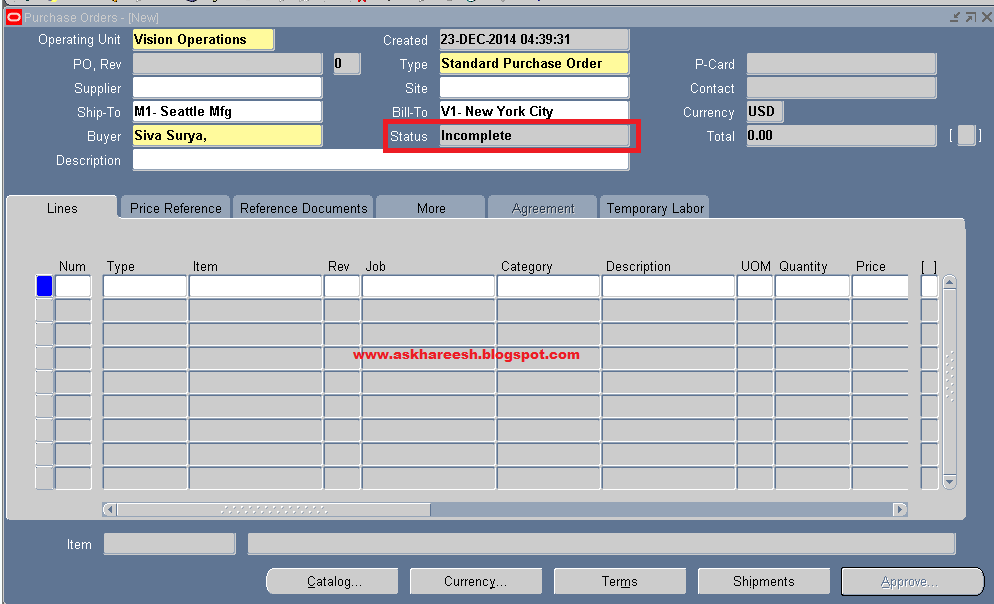
In this post, we are going to hide a field "Status" in Purchase Orders form.
Open purchase orders form.
Navigation: Purchasing Vision Operations (USA) --> Purchase Orders --> Purchase Orders
Form Personalization: Hiding a field, askHareesh blog for Oracle Apps

So here, we are hiding Status field.
Form Personalization: Hiding a field, askHareesh blog for Oracle Apps

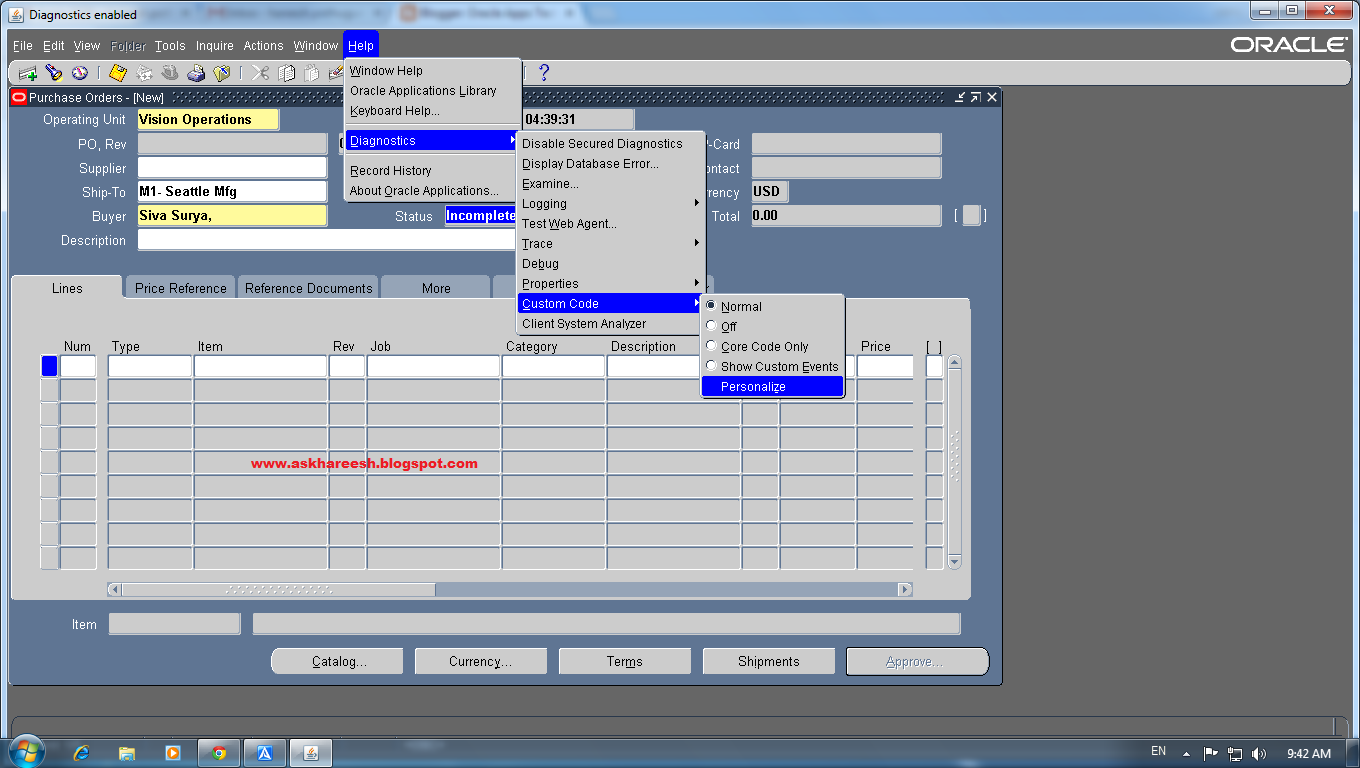
Now go to Help --> Diagnostics --> Custom Code --> Personalize
Form Personalization: Hiding a field, askHareesh blog for Oracle Apps

Add Seq, Description fields as below screenshot.
Form Personalization: Hiding a field, askHareesh blog for Oracle Apps

Now go to Actions tab.
add Seq, Object Type, Target Object, Property Name, Value.
Form Personalization: Hiding a field, askHareesh blog for Oracle Apps

Click on save. close the window and form it asks for changes save click Yes and Ok.
Again open Purchase Orders form, now you can't see the status field.
Form Personalization: Hiding a field, askHareesh blog for Oracle Apps


Also read : Procure to Pay (P2P) Cycle


You are Not Setup as a Worker. To Access This Form You Need To Be a Worker

You are Not Setup as a Worker. To Access This Form You Need To Be a Worker

Below is the note shown by application while normal user trying to access a form.
"You are not setup as a worker. To access this form you need to be a worker." That means when you dont have permission to access the form, it will raise. Generally we see this while opening Purchase Order Form.


You are Not Setup as a Worker. To Access This Form You Need To Be a Worker, askHareesh blog for Oracle Apps

We need to create employee and setup as a worker/buyer to solve.


Steps to setup user as worker/buyer:

Step1: Navigate to Human Resources->People->Enter and Maintain
Provide all mandatory details in People form. Select Person Types as Employee(Use Action lov to get this) . Save the changes.


You are Not Setup as a Worker. To Access This Form You Need To Be a Worker, askHareesh blog for Oracle Apps

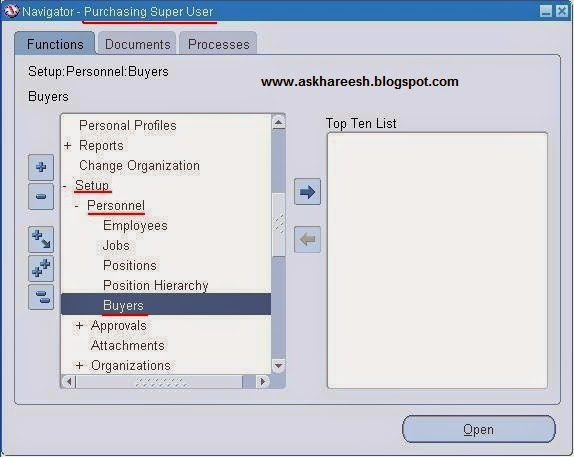
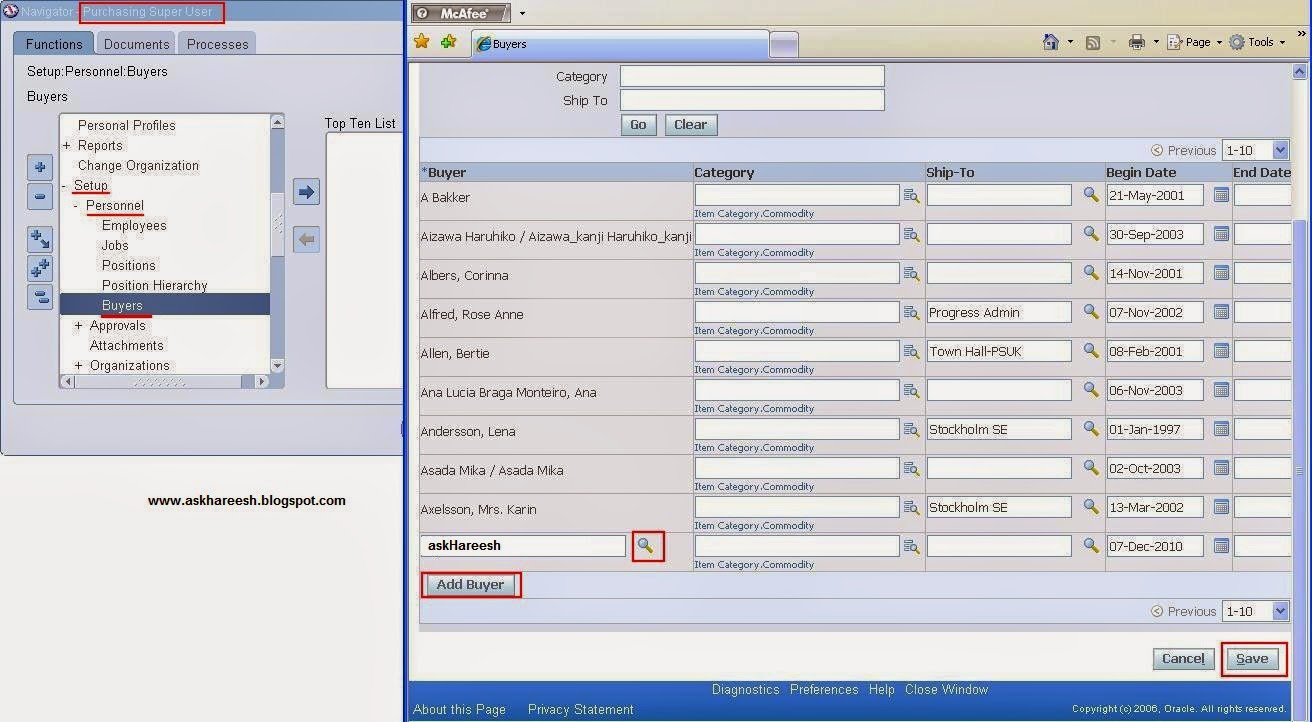
Step2: Navigate to Purchasing->Setup->Personnel->Buyers

This opens Buyers OA page. Click on Add Buyer button and add the person created in last step as a Buyer. Save Changes.


You are Not Setup as a Worker. To Access This Form You Need To Be a Worker, askHareesh blog for Oracle Apps


You are Not Setup as a Worker. To Access This Form You Need To Be a Worker, askHareesh blog for Oracle Apps

Step3: Navigate to System Administrator->Security->User->Define

It opens Users form. Query your preferred user details.


You are Not Setup as a Worker. To Access This Form You Need To Be a Worker, askHareesh blog for Oracle Apps

Add person created in the previous steps to this user. Save Changes.


You are Not Setup as a Worker. To Access This Form You Need To Be a Worker, askHareesh blog for Oracle Apps

Step4: Problem has been resolved, now you may open your form.
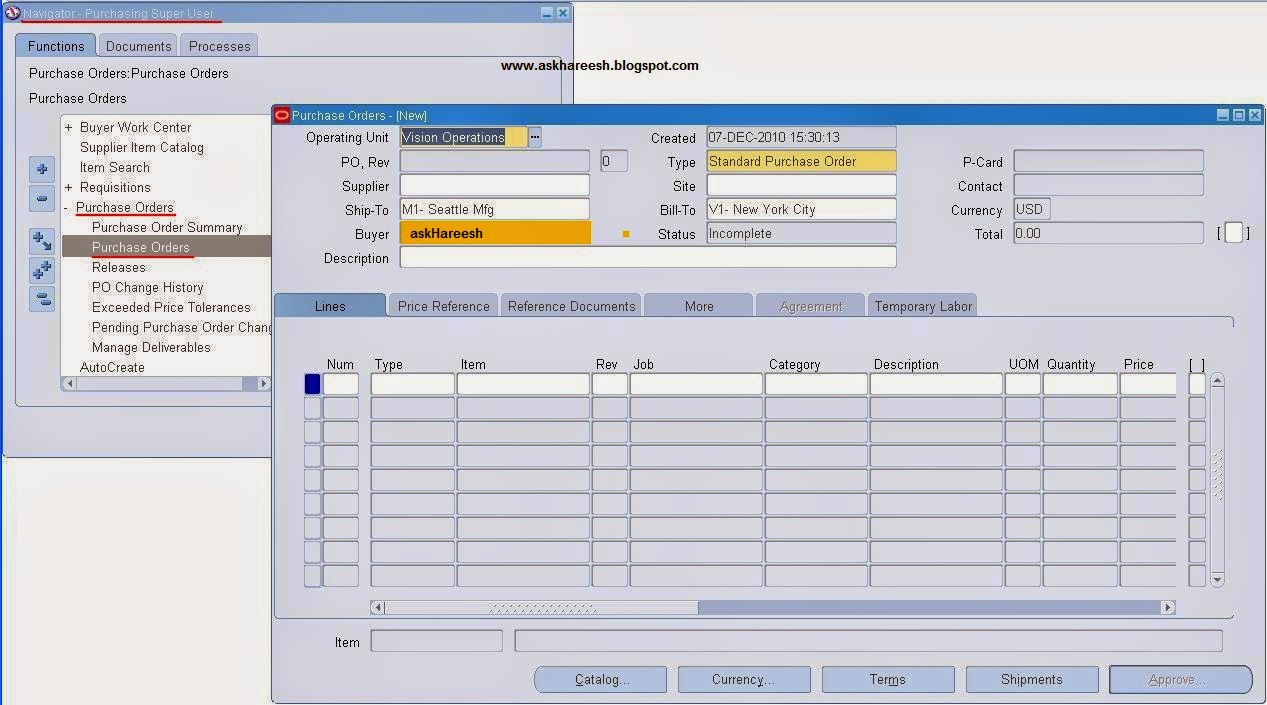
Navigate back to Purchasing->Purchase Orders->Purchase Orders
Now application allow you to see Purchase Order form with out any notes.

You are Not Setup as a Worker. To Access This Form You Need To Be a Worker, askHareesh blog for Oracle Apps


Types of Purchase Orders

Types of Purchase Orders,AskHareesh blog for OracleApps

Types of Purchase Orders (PO types)

Standard Purchase Order: A standard purchase order is a type of purchase agreement with the supplier committing to buy its items or services if all the details like terms and conditions, items, price, delivery dates are, the first priority of choosing a purchase order is given to standard purchase order

Planned Purchase Order: A planned purchase order is a long-term agreement committing to buy it items or services from a single source. We must specify tentative delivery schedules and all details for goods or services that we want to  buy, including charge account, quantities and estimated cost. EX: Buying goods for a festival from a specific dealer.

Contract Purchase Order: We can create contract purchase agreement with our supplier to agree on specific terms and conditions without indicating the goods and services that we will be purchasing . We can later issue standard PO referencing our contracts and we can encumber these purchase orders if we use  encumbrance accounting. buyer can ask any item from the list that is provided by the supplier

Blanket Purchase Order: We can create blanket purchase agreements when we know the detail of goods or services we have plan to buy from a specific supplier in a period , but we do not yet know the detail of our delivery schedules. We can use blanket purchase agreements to specify negotiated prices for our items before actually purchasing them, here the buyer should specify the goods that are needed to his requirement from the list of supplier, tables that effect the blanket po are po_headers_all and po_releases_all


Reports in Purchase Order

Reports in Purchase Order

REPORTS OPTIONS FOR ACCESSING PURCHASE ORDER INFORMATION

There are 15-16 reports provide the access PO information in reporting format.Lets summarize some of them, these listing are based on the availability as per Oracle 11i10.2.

1. Purchase Order Detail Report
This report can be used to review all, specific standard, or planned purchase orders. This is used for review the open purchase orders to determine how much you still have to receive and how much your supplier has already billed you.

2. Printed Change Orders (Landscape) Report
This report is used to print changed purchase orders in landscape format. Oracle Purchase provides a default format for the preprinted form.

3.Printed Change Orders (Portrait) Report
This report can be used to provides the same information as the landscape version, but printed in portrait format.

4.Printed Purchase Orders (Landscape Report)
This report can be used to print purchase orders in landscape format.Oracle Purchase provides a default format for the preprinted form.

5.Printed Purchase Orders (Portrait) Report
This report contains the same information as the landscape version, but is printed in portrait format.

6.Blanket and Planned PO Status Report
This report can be used to review purchase order transactions for blanket purchase agreements and planned purchase orders. Information will print for releases existing against the orders. If no release exists, only the purchase order header information is printed.

7.Contract Status Report
This review the status of your contract and list purchase order information regarding each contract using this report.

8.Purchase Agreement Audit Report
This report is used to review purchase order transactions for items normally required to buy using blanket purchase agreements. Oracle Purchase shows you when you purchased items using a standard purchase order that you could have purchased using a blanket purchase agreement.

9.Purchase Order and Releases Detail Report
This report can be used to review detail information for your blanket purchase agreements and planned purchase orders. The quantity ordered, receive and billed and the quantity due to be received are displayed so you can monitor the status Purchase Order Commitment by Period Report

10.Open Purchase Orders Report (by Buyer)
This report is used to review all or specific open purchase orders for specific buyers.

11.Open Purchase Order Report (by Cost Centre)
This report can be used to review all or specific open purchase orders relating to order charged to one or more cost centre suing this report.

12.Purchasing Activity Register Report
This report can be used to review purchase order monetary activity carried out for a time interval, such as a day or month.

13.Purchase Order Distribution Detail Report
This report can be used to review account distribution for a purchase order.

14.Purchase Summary Report by Category
This report can used to review the number of orders you place with vendors for a given category of item.

15.Cancelled Purchase Orders Report
This is used to review cancelled purchase orders.

16. Standard Notes Listing
This is used to review standard notes.


Purchase Order Types

 
Types of Purchase Orders,AskHareesh Blog for OracleApps

Purchase Order Types

Oracle Purchasing provides the following purchase order types: Standard Purchase Order, Planned Purchase Order, Blanket Purchase Agreement and Contract Purchase Agreement. You can use the Document Name field in the Document Types window to change the names of these documents. For example, if you enter Regular Purchase Order in the Document Name field for the Standard Purchase Order type, your choices in the Type field in the Purchase Orders window will be Regular Purchase Order, Planned Purchase Order, Blanket Purchase Agreement and Contract Purchase Agreement.

Standard Purchase Orders:-


You generally create standard purchase orders for one–time purchase of various items. You create standard purchase orders when you know the details of the goods or services you require, estimated costs, quantities, delivery schedules, and accounting distributions. If you use encumbrance accounting, the purchase order may be encumbered since the required information is known.

Blanket Purchase Agreements (BPA):-


You create blanket purchase agreements when you know the detail of the goods or services you plan to buy from a specific supplier in a period, but you do not yet know the detail of your delivery schedules. You can use blanket purchase agreements to specify negotiated prices for your items before actually purchasing them. BPA are widely used in product manufacturing companies.

You can issue a blanket release against a blanket purchase agreement to place the actual order (as long as the release is within the blanket agreement effectivety dates). If you use encumbrance accounting, you can encumber each release.

Contract Purchase Agreements:-


You create contract purchase agreements with your suppliers to agree on specific terms and conditions without indicating the goods and services that you will be purchasing. You can later issue standard purchase orders referencing your contracts, and you can encumber these purchase orders if you use encumbrance accounting.

Planned Purchase Order:-


You create a planned purchase order when you want to establish a long term agreement with a single source supplier with a commitment to buy goods or services. Planned purchase orders include tentative delivery schedules and accounting distributions. You then create scheduled releases against the planned purchase order to actually order the goods or services.

A planned purchase order is a type of purchase order you issue before you order actual delivery of goods and services for specific dates and locations. Ascheduled release is issued against a planned purchase order to place the actual order. You can also change the accounting distributions on each release and the system will reverse the encumbrance for the planned purchase order and create a new encumbrance for the release.

Navigation to setup the periods

Navigation to setup the periods:

1. Ensure that the  GL Period  has Status=Open:
Setup > Financial > Accounting > Open and Close periods
(or)
Setup > Open and Close periods

2. Ensure the Purchasing Period is Open:
Setup > Financial > Accounting > Control Purchasing Period

3. Please note that the Inventory period must also be Open:
Accounting close cycle > Inventory Accounting Periods

Query to check the status of the Periods


Link Purchase Order and Requisition

Link Purchase Order and Requisition,AskHareesh Blog for OracleApps

Link Purchase Order and Requisition

You have a purchase order and you have a requisition, but wait how do you know how this purchase order is linked with requisition. Here is the query thats answers this. Use this query find linked Purchase order and Requisition.
This could be really a helpful one.

SELECT prh.segment1 req_number
      ,prh.authorization_status
      ,prl.line_num req_line_num
      ,prl.item_description req_item_description
      ,prl.unit_price req_unit_price
      ,prl.quantity req_quantity
      ,pd.req_header_reference_num
      ,pd.req_line_reference_num
      ,pl.line_num
      ,pl.item_description
      ,pl.quantity
      ,pl.amount
      ,ph.segment1 po_number
      ,prd.distribution_id
      ,pd.req_distribution_id
  FROM po_requisition_headers_all prh
      ,po_requisition_lines_all   prl
      ,po_req_distributions_all   prd
      ,po_distributions_all       pd
      ,po_line_locations_all      pll
      ,po_lines_all           pl
      ,po_headers_all             ph
 WHERE prh.requisition_header_id = prl.requisition_header_id
   and prh.org_id = prl.org_id
   and prl.requisition_line_id = prd.requisition_line_id
   and prl.org_id = prd.org_id
   and prd.distribution_id = pd.req_distribution_id(+)
   and prd.org_id = pd.org_id(+)
   and pd.line_location_id = pll.line_location_id(+)
   and pd.org_id = pll.org_id(+)
   and pll.po_line_id = pl.po_line_id(+)
   and pll.org_id = pl.org_id(+)
   and pl.po_header_id = ph.po_header_id(+)
   and pl.org_id = ph.org_id(+)

Purchase Order Report Query

Purchase Order Report Query, www.askhareesh.com
Header level
SELECT      PHA.SEGMENT1            PONUM
            ,PHA.TYPE_LOOKUP_CODE   POTYPE
            ,H1.LOCATION_CODE       BILLTO
            ,H2.LOCATION_CODE       SHIPTO
            ,PHA.CREATION_DATE      CDATE
            ,PPF.LAST_NAME||','||PPF.FIRST_NAME BUYER
            ,APS.VENDOR_NAME        SUPPLIER
            ,APSS.VENDOR_SITE_CODE  SUPPLIERSITE
            ,APSC.LAST_NAME||','||APSC.FIRST_NAME   CONTACT
            ,PHA.AUTHORIZATION_STATUS   STATUS
            ,APT.NAME               PAYMENTTERMS
            ,PHA.FREIGHT_TERMS_LOOKUP_CODE  FRIEGHT
            ,PHA.FOB_LOOKUP_CODE        FOB
            ,PHA.SHIP_VIA_LOOKUP_CODE   CARRIER
            ,PHA.PO_HEADER_ID
FROM        PO_HEADERS_ALL          PHA
            ,HR_LOCATIONS           H1
            ,HR_LOCATIONS           H2
            ,PER_ALL_PEOPLE_F       PPF
            ,AP_SUPPLIERS           APS
            ,AP_SUPPLIER_SITES_ALL  APSS
            ,AP_SUPPLIER_CONTACTS   APSC
            ,AP_TERMS               APT
WHERE       PHA.SEGMENT1            =   '6042'
AND         PHA.BILL_TO_LOCATION_ID =   H1.LOCATION_ID
AND         PHA.SHIP_TO_LOCATION_ID =   H2.LOCATION_ID
AND         PHA.AGENT_ID            =   PPF.PERSON_ID
AND         PHA.VENDOR_ID           =   APS.VENDOR_ID
AND         PHA.VENDOR_SITE_ID      =   APSS.VENDOR_SITE_ID
AND         PHA.VENDOR_CONTACT_ID   =   APSC.VENDOR_CONTACT_ID
AND         PHA.TERMS_ID            =   APT.TERM_ID

Line level
SELECT      PLA.LINE_NUM    LINENO
            ,MSI.SEGMENT1   ITEM
            ,MSI.DESCRIPTION    DESCRIPTION
            ,PLA.QUANTITY
            ,PLA.UNIT_PRICE PRICE
            ,PLA.PO_LINE_ID
FROM        PO_LINES_ALL        PLA
            ,MTL_SYSTEM_ITEMS_B MSI
WHERE       PO_HEADER_ID        =     110371
AND         PLA.ITEM_ID         =     MSI.INVENTORY_ITEM_ID
AND         MSI.ORGANIZATION_ID =   204

Shipment level
SELECT      PLLA.SHIPMENT_NUM
            ,H1.LOCATION_CODE
            ,HRO.NAME
            ,PLLA.LINE_LOCATION_ID
FROM        PO_LINE_LOCATIONS_ALL   PLLA
            ,HR_LOCATIONS            H1
            ,HR_OPERATING_UNITS     HRO
WHERE       PLLA.PO_LINE_ID     IN   (173300,173301)
AND         PLLA.SHIP_TO_LOCATION_ID    =   H1.LOCATION_ID
AND         PLLA.ORG_ID                 =   HRO.ORGANIZATION_ID

Distributions level
SELECT      PDA.QUANTITY_ORDERED    QTY
            ,PDA.DISTRIBUTION_NUM   DNO
            ,PPF.FULL_NAME          REQUESTOR
FROM        PO_DISTRIBUTIONS_ALL    PDA
            ,PER_ALL_PEOPLE_F        PPF
WHERE       PDA.LINE_LOCATION_ID    IN (264474,264475,264476)
AND         PDA.DELIVER_TO_PERSON_ID = PPF.PERSON_ID

Also Read : Procure to Pay Cycle


PO Requisition Interface

PO Requisition Interface,AskHareesh Blog for OracleApps

Download this document : click Here
Interface tables: 

PO_REQUISITIONS_INTERFACE_ALL


Base tables:     

PO_REQUISITIONS_HEADERS_ALL                     

PO_REQUISITION_LINES_ALL     

PO_REQ_DISTRIBUTIONS_ALL


Concurrent program:

REQUISITION IMPORT


Validations: 

Check for interface transaction source code, requisition destination type,
 quantity ordered, authorization status type.


Some important columns that need to be populated in the interface tables:

PO_REQUISITIONS_INTERFACE_ALL:

INTERFACE_SOURCE_CODE (to identify the source of your imported
Requisitions)
DESTINATION_TYPE_CODE
AUTHORIZATION_STATUS
PREPARER_ID or PREPARER_NAME
QUANTITY
CHARGE_ACCOUNT_ID or charge account segment values
DESTINATION_ORGANIZATION_ID or DESTINATION_ORGANIZATION_CODE
DELIVER_TO_LOCATION_ID or DELIVER_TO_LOCATION_CODE
DELIVER_TO_REQUESTOR_ID or DELIVER_TO_REQUESTOR_NAME
ORG_ID
ITEM_ID or item segment values (values if the SOURCE_TYPE_CODE or
DESTINATION_TYPE_CODE is ‘INVENTORY’)


apps.fnd_request.submit_request
                        (
                         application      => 'PO',
                         program          => 'REQIMPORT',
                         description      => '',
                         start_time       => TO_CHAR(SYSDATE,'DD-MON-YY HH24:MI:SS'),
                         sub_request      => FALSE,
                         argument1        => 'INV',--Interface Source code,
                         argument2        => 1035,  ----APPS.SONA_BATCH_ID_S.CURRVAL,--Batch ID,
                         argument3        => 'ALL',--Group By,
                         argument4        => '',--Last Req Number,
                         argument5        => '',--Multi Distributions,
                         argument6        => 'N'
                          );


EXAMPLE :


  INSERT INTO PO_REQUISITIONS_INTERFACE_ALL(
                                                                  DELIVER_TO_LOCATION_ID
                                                                , DELIVER_TO_REQUESTOR_ID
                                                                , AUTHORIZATION_STATUS
                                                                , REQUISITION_HEADER_ID
                                                                , REQUISITION_TYPE
                                                                , CREATION_DATE
                                                                , CREATED_BY
                                                                , QUANTITY
                                                                , UNIT_PRICE
                                                                , ITEM_SEGMENT1
                                                                , ITEM_DESCRIPTION
                                                                , CATEGORY_ID
                                                                , CURRENCY_CODE
                                                                , PREPARER_ID
                                                                , CHARGE_ACCOUNT_ID
                                                                , REQ_NUMBER_SEGMENT1
                                                                , SOURCE_TYPE_CODE
                                                                , HEADER_DESCRIPTION
                                                                , BATCH_ID
                                                                , DESTINATION_TYPE_CODE
                                                                , DESTINATION_ORGANIZATION_ID
                                                                , INTERFACE_SOURCE_CODE
                                                                , UNIT_OF_MEASURE
                                                                ,NEED_BY_DATE
                                                                ,LINE_ATTRIBUTE9
                                                                )
                                                              VALUES
                                                                (
                                                                 2734                                               ----->  DELIVER_TO_LOCATION_ID
                                                                ,3336                                               -----> DELIVER_TO_REQUESTOR_ID
                                                                ,'INCOMPLETE'                                        -----> AUTHORIZATION_STATUS
                                                                ,PO_REQUISITION_HEADERS_S.NEXTVAL     -----> REQUISITION_HEADER_ID
                                                                ,'PURCHASE'                                          ----> REQUISITION_TYPE
                                                                ,SYSDATE                                              ----> CREATION_DATE
                                                                ,6871                                                 ----> CREATED_BY
                                                                ,20                       ---> QUANTITY
                                                                ,ln_unit_rate                                         ---> UNIT_PRICE
                                                                ,ITEM_SEGMENT1                                         ----->ITEM_SEGMENT1
                                                                ,ITEM_DESCRIPTION                                    -----> ITEM_DESCRIPTION
                                                                ,62                                                   ----> CATEGORY_ID
                                                                ,'INR'                                                -----> CURRENCY_CODE
                                                                ,3336                                                 -----> PREPARER_ID
                                                                ,2376                                                 ----> CHARGE_ACCOUNT_ID
                                                                ,NULL                                                 ----> REQ_NUMBER_SEGMENT1
                                                                ,'VENDOR'                                             ----> SOURCE_TYPE_CODE
                                                                ,HEADER_DESCRIPTION                                       -----> HEADER_DESCRIPTION
                                                                ,1035                   ---APPS.SONA_BATCH_ID_S.NEXTVAL               -----> BATCH_ID
                                                                ,'INVENTORY'                                          ------> DESTINATION_TYPE_CODE
                                                                ,DESTINATION_ORGANIZATION_ID         ----->  DESTINATION_ORGANIZATION_ID
                                                                ,'INV'                                                --->  INTERFACE_SOURCE_CODE
                                                                ,ln_unit_measure                                      ----> UNIT_OF_MEASURE
                                                                ,(sysdate + 10)                                       -----> NEED_BY_DATE
                                                                ,NULL
                                                                );

Download this document : click Here