Supplier Creation in Oracle Apps R12 : Part2

Assign to Supplier Site

Supplier Creation in Oracle Apps R12, www.askhareesh.com

Supplier Site is created.

Supplier Creation in Oracle Apps R12, www.askhareesh.com

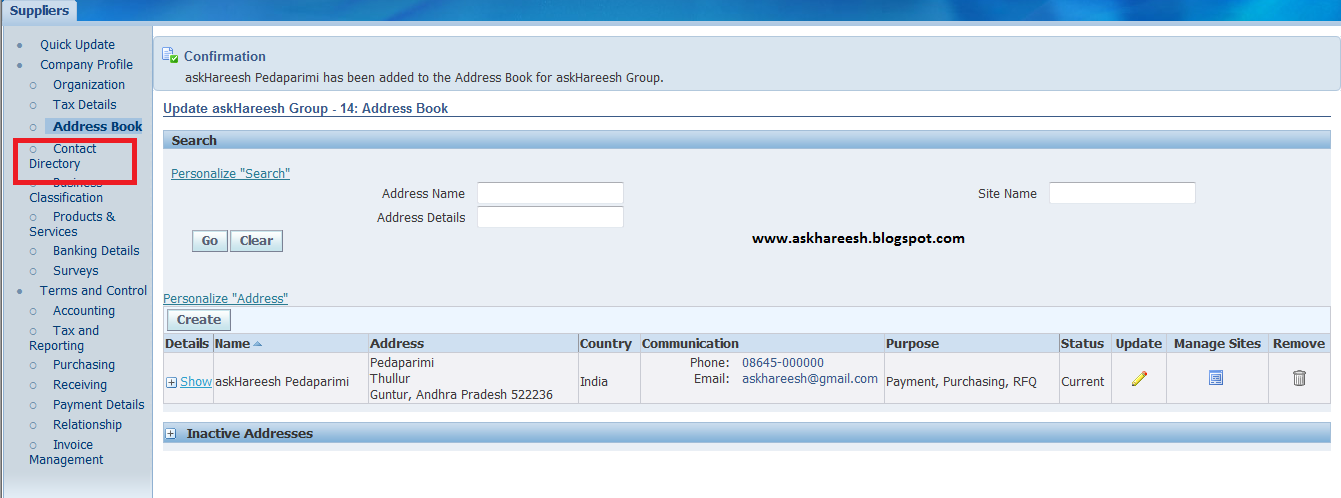
Contact Creation
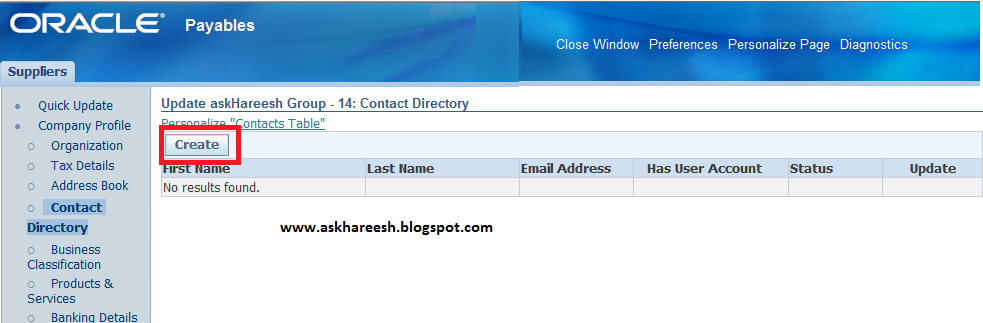
Click on Contact Directory as shown above and create button as below.

Supplier Creation in Oracle Apps R12, www.askhareesh.com

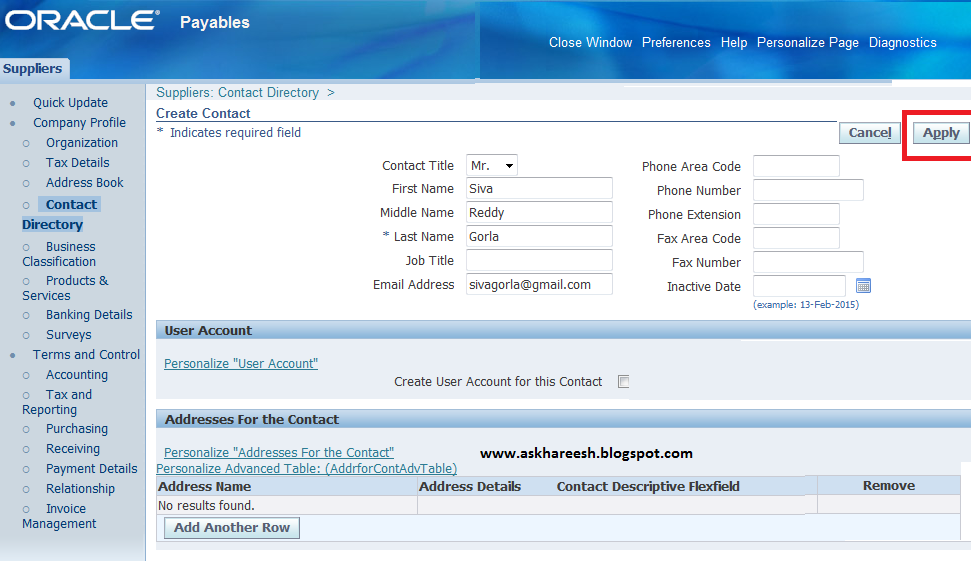
Enter Contact Details as below.

Supplier Creation in Oracle Apps R12, www.askhareesh.com

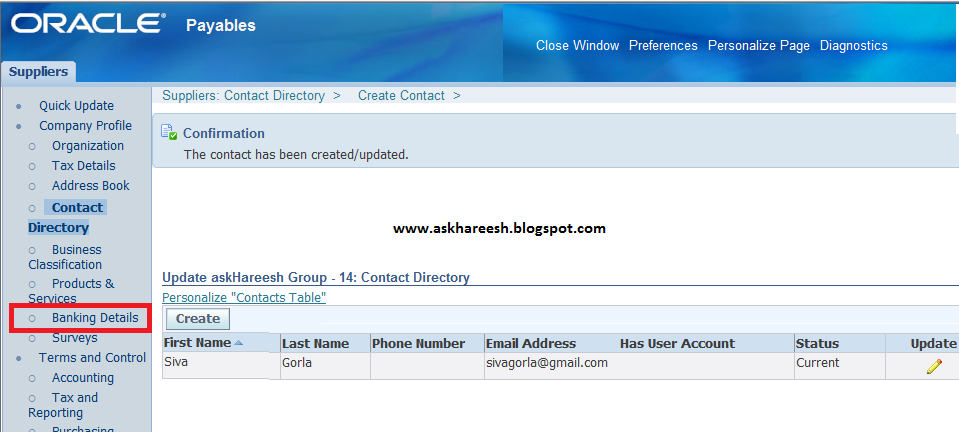
Contact  details created.

Supplier Creation in Oracle Apps R12, www.askhareesh.com

Bank Account creation
Click on Banking details as above and create as below.

Supplier Creation in Oracle Apps R12, www.askhareesh.com


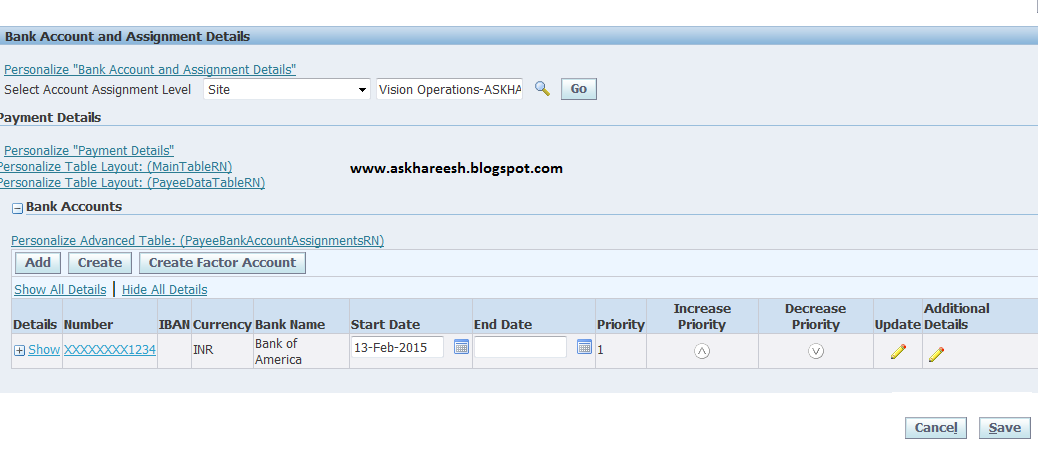
Enter Banking Details as below (Existing Bank account and Branch).

Supplier Creation in Oracle Apps R12, www.askhareesh.com
 Click on Apply. Bank details created successfully.
Supplier Creation in Oracle Apps R12, www.askhareesh.com
So we created Supplier, Supplier SIte and Banking details.



Tax Types supported by Oracle Apps

Tax Types supported by Oracle Apps, askhareesh blog for Oracle Apps

  1. VAT (value Added Tax supported by India)
  2. Recoverable and Non_recoverable input taxes
  3. Withholding Taxes
  4. Goods And service Tax
  5. EU Acquiaition and Reverse Charge Taxes
  6. Deferred Output Taxes
  7. Canadian Govt ,Provincial and Harmonized Sales Tax
  8. Sales Equilization Taxes (Also known as Sales Tax)
  9. Investment Tax
  10. Excise Duties Tax
  11. Latin American Tax  regimes


Example for adding/extend custom tags to R12 Payment Funds Disbursement XML file

Example for adding/extend custom tags to R12 Payment Funds Disbursement XML file, askhareesh blog for Oracle Apps
Here, i want to add alternate supplier name in the tag Extend/AltSupName. So modified the Get_Pmt_Ext_Agg function in IBY_FD_EXTRACT_EXT_PUB package as below.


FUNCTION Get_Pmt_Ext_Agg (p_payment_id IN NUMBER)
   RETURN XMLTYPE
IS
   v_supplier_name       ap_suppliers.vendor_name%TYPE;
   v_alt_supplier_name   XMLTYPE;
BEGIN
   BEGIN
      SELECT NVL (HP.ORGANIZATION_NAME_PHONETIC, HP.PARTY_NAME)
        INTO V_SUPPLIER_NAME
        FROM iby_payments_all IPA, HZ_PARTIES HP
       WHERE IPA.INV_PAYEE_PARTY_ID = HP.PARTY_ID
             AND ipa.payment_id = p_payment_id;
   EXCEPTION
      WHEN OTHERS
      THEN
         v_supplier_name := NULL;
   END;

   --build the XML string
   SELECT XMLCONCAT (
             XMLELEMENT ("Extend",
                         XMLELEMENT ("AltSupName", v_supplier_name)))
     INTO v_alt_supplier_name
     FROM DUAL;

   RETURN v_alt_supplier_name;
--RETURN NULL;
END Get_Pmt_Ext_Agg;

Give custom tag in document like as below:

Example for adding/extend custom tags to R12 Payment Funds Disbursement XML file, askhareesh blog for Oracle Apps


Read: Adding new fields to the R12 Payment Funds Disbursement XML file


Adding new fields to the R12 Payment Funds Disbursement XML file

Adding new fields to the R12 Payment Funds Disbursement XML file, askhareesh blog for Oracle Apps
Standard PL/SQL package to use to extend or add additional tags to the XML file generated during a R12 Oracle Payments ‘Payment Process Request’ is IBY_FD_EXTRACT_EXT_PUB.
  • You cannot customize the package specification, but package body contains stubbed functions that you can customize.
  • We use this XML file as the data source for the XML Publisher cheque or wire or electronic file presentation layout.
We need to understand the structure of the XML file created by the Payments process request to use IBY_FD_EXTRACT_EXT_PUB package.
We can customize file in following levels.

Level1:
Outbound Payment Instruction: This is the top level of the XML File and there is one Outbound Payment Instruction per Payment process request.
Function: Get_Ins_Ext_Agg(p_payment_instruction_id IN NUMBER)
Query:
SELECT *
FROM iby_pay_instructions_all
WHERE payment_instruction_id = p_payment_instruction_id;

Level2:
Outbound Payment: This is the Payment Level i.e. an individual cheque or BACS payment amount to a supplier. There can be multiple Outbound Payments per Outbound Payment Instruction.
Function: Get_Pmt_Ext_Agg(p_payment_id IN NUMBER)
Query:
SELECT *
FROM iby_payments_all ipa
WHERE ipa.payment_id = p_payment_id;

Level3:
Document Payable: Details the documents like invoices being paid. There can be multiple Document Payable tags per Outbound Payment.
Function: Get_Doc_Ext_Agg(p_document_payable_id IN NUMBER)
Query:
SELECT *
FROM iby_docs_payable_all dp
WHERE dp.document_payable_id = P_document_payable_id;

Level4:
Document Payable Line: This level details the invoice line. There can be multiple Document Payable Line tags per Document Payable.
Function: Get_Docline_Ext_Agg(p_document_payable_id IN NUMBER, p_line_number IN NUMBER)

Level5:
Payment Process Profile: This level allows XML element to be introduced at document payable level and run once for each payment process request.
Function: Get_Ppr_Ext_Agg(p_payment_service_request_id IN NUMBER)
Query:
SELECT *
FROM iby_pay_service_requests WHERE payment_service_request_id = p_payment_service_request_id;

We can add/extend additional XML tags can be added at each of these 4 levels by coding/modifying functions in IBY_FD_EXTRACT_EXT_PUB.

Payables Open Interfaces

Payables Open Interfaces, www.askhareesh.com
Payables Provides several open interfaces to import data into oracle
  • Payables Open Interface
  • Payables Expense Report Open Interface
  • Payables PCard Open Interface
  • Payables Credit Card Open Interface
  • Payables Matching Open Interface
  • Payables Supplier Open Interface
Payables Open Interface : Payables  open interface is an interface provided by oracle to import invoices into the system using various sources such as Auto invoice process, EDI ecommerece  gateway, invoices from credit card and procurement card transactions and invoices from external systems.  You can load standard invoices as well as credit memos using the Payables Invoice Open Interface. Once the invoices are loaded into the system, Payables Import program can be run to import the invoices into Oracle.

Payables Expense Report Interface: Accounts payables team can key in paper invoices  using the expense reports or employees can submit their expenses  using the invoice expense report.The payables Invoice Import Report can be submitted to validate the expense report data and  create expense reports in oracle

Payables PCard Open Interface : Some business can streamline the procure thopay process by using procurement cards. Employees can purchase the required items using credit cards and suppliers can send the relevant information to the payables interface. The payables invoice import program can be submitted to generate invoices  for these transactions..

Payables Credit Card Expenses Businesses use SQL loader scripts to load credit card expenditure related system into the interface tables which can later be imported into the system to create expense reports. Oracle has predefined the Loader Scripts for credit cards like : American Express, Visa etc.

Payables Matching Open Interface: Use SQL*Loader to load the required information into the purchasing interface tables. You will need to create a SQL*Loader control file to format the information you want to load. The file you write will vary greatly depending on the nature and format of the flat file you use. You match invoices to purchase order shipments during invoice entry.

Payables Supplier Interface : Businesses use this interface to enter the supplier and supplier site information in the system. Once the data is entered Payables Supplier import program can be run to create  suppliers in the system

Supplier Creation in Oracle Apps R12

Supplier creation
Navigation : Purchasing Vision Operations --> Supply Base --> Suppliers


Supplier Creation in Oracle Apps R12, www.askhareesh.com

Click on Create Supplier.
Enter Organization name and Country of origin.


Supplier Creation in Oracle Apps R12, www.askhareesh.com

Click on Apply Button.


Supplier Creation in Oracle Apps R12, www.askhareesh.com

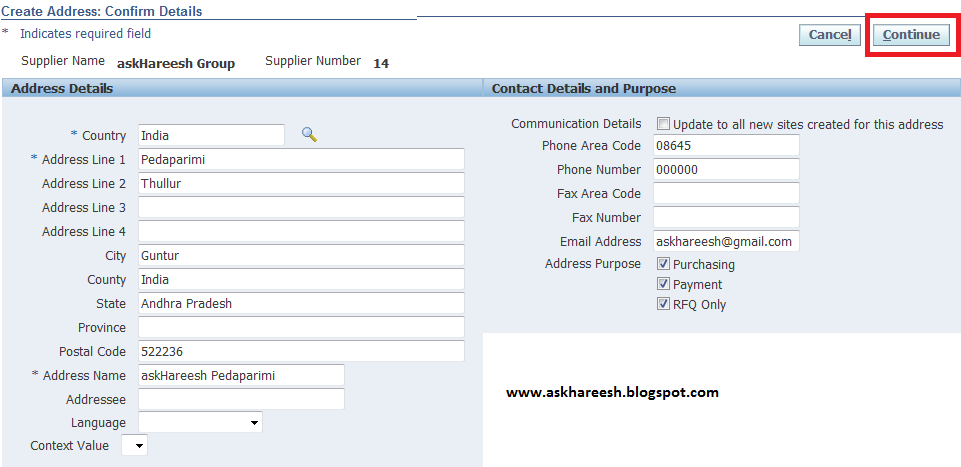
Address creation:
Click on Address book as shown above and create button as below.

Supplier Creation in Oracle Apps R12, www.askhareesh.com

Enter Address details as below and click on continue.


Supplier Creation in Oracle Apps R12, www.askhareesh.com


AP Module 12 Release New Features

Integration with Oracle E-Business Tax : AP Module 12 Release New Features

Integration with Oracle E-Business Tax : AP Module 12 Release New Features, askhareesh blog for Oracle Applications

Integration with Oracle E-Business Tax

In Release 12, Oracle E-Business Tax, a new product, will manage transaction tax across the E-Business Suite. In prior releases, the setup, defaulting and calculation of transaction tax for Payables was managed within Payables using tax codes, their associated rates and a hierarchy of defaulting options. This method of managing tax is still available to you in Release 12. During the upgrade, E-Business Tax migrates the tax codes and their rates to corresponding tax rules so that your tax processing can get the same results after the upgrade as it did before. If you choose to use the features of E-Business Tax, you can make the transition at your own pace, incrementally adding E-Business Tax rules to meet your requirements.

In Release 12, there are new fields added to the supplier, invoice, and related entities that track tax attributes used by E-Business Tax. Many of these attributes were implemented with Global Descriptive Flexfields in prior releases and are upgraded to
regular fields on these entities.

Also during the upgrade, E-Business Tax takes information from the AP invoice lines and creates summary and detail tax lines in the E-Business Tax repository. The tax lines are upgraded based on the time period you specify during the submission of the upgrade. During the upgrade, Payables creates payment distributions and prepayment application distributions for existing transactions and creates links between these new distributions and the original invoice distributions. After the upgrade, if you adjust a historical transaction that was not upgraded, E-Business Tax automatically upgrades the transaction to the Release 12 entities.

Tax Attributes Controlled by Global Descriptive Flexfields Migrated to Core Payables and E-Business Tax Entities

The following tax attributes were implemented using descriptive flexfields on the invoice entities in Release 11i and are now implemented using named columns. The Invoice Lines upgrade will upgrade the values from the descriptive flexfields segments to the new columns.

The following are new fields on the invoice header and in the invoice interface:
  • Business Category
  • Fiscal Classification
  • Invoice Sub-type
  • Port of Entry
  • Supplier Exchange Rate
  • Supplier Tax Invoice Date
  • Supplier Tax Invoice Number
  • Tax Date
  • Tax Reference Number
The following are new fields on the invoice line and in the invoice lines interface:
  • Assessable Value
  • Business Category
  • Deferred Option, Distribution Account
  • Fiscal Classification
  • Intended Use
  • Product Category
  • Ship-To Location
  • Supplier Exchange Rate
  • User Defined Fiscal Classification
The following are new fields on the invoice distribution:
  • Fiscal Classification
  • Distribution Account
  • Intended Use 

Integration with Oracle Subledger Accounting : AP Module 12 Release New Features

Integration with Oracle Subledger Accounting : AP Module 12 Release New Features, askhareesh blog for Oracle Applications

Integration with Oracle Subledger Accounting

Release 12 introduces a new module, Subledger Accounting (SLA), for managing accounting across subledger transactions. With the introduction of SLA, Payables will no longer create accounting entries, but will instead rely on the central SLA engine to do so. During the upgrade, accounting options and their settings, and the existing accounting entries in the Payables data model are moved to the new SLA accounting data model. Also during the upgrade, Payables sets up SLA to replicate the accounting created by Payables in Release 11i.

The new SLA architecture requires Payables to maintain specific data relating to transactions. SLA uses this data to generate accounting entries. In order to achieve this it was determined that both payment distributions and prepayment application distributions would be introduced into the Payables data model. Unlike invoice
distributions that can be entered by the user, payment distributions will be generated automatically and will be associated with each accounted payment.

During the upgrade, all accounting events, headers and lines from the 11i data model are upgraded to the new Subledger Accounting events, headers and lines data model, regardless of the number of periods you specify when submitting the upgrade. If the Global Accounting Engine (AX) is enabled for the set of books associated with a given Operating Unit, then the upgrade migrates the AX accounting events, headers and lines to SLA instead of those in Payables. The payment distributions and prepayment application distributions are upgraded based on time periods you specify during the submission of the upgrade. During the upgrade, Payables creates payment distributions and prepayment application distributions for existing transactions in the periods you specify for upgrade and creates links between these new distributions and the original invoice distributions.

If you have customizations based on the 11i AP accounting tables, you need to transition them to use the SLA data model. Also note, if you use Oracle Projects, Projects uses SLA in Release 12 and creates accounting entries for adjustments rather than using Payables to create those entries as in prior releases. If you have any customizations based on Project adjustments, you will need to transition them to the SLA data model.

The Deferred Expenses feature, supported with Global Descriptive Flexfields at the invoice distribution level in Release 11i, has been replaced by the Multi-Period Accounting feature in SLA.

Upgrading Payables Accounting Entries to Subledger Accounting

The following table displays the mapping from 11i entities to new Release 12 entities.

Source 11i Entity
Release 12 Entity
AP/AX Accounting Events, Headers, Lines
SLA Accounting Events, Headers, Lines
AP Payment History, Invoice Payments and
Invoice Distributions
AP Payment History and AP Payment
Distributions
AP Prepayment History and Invoice
Distributions
AP Prepayment Application Distributions
AP Accounting Lines and Invoice
Distributions
AP Distribution Links


Upgrading Payables System Options to SLA

The following table displays the mapping from 11i system option settings to the new
accounting setup entities and settings.

Source 11i Window and Field
Release 12 Window and Field
Payables Options: Primary Accounting
Method
GL Accounting Setup: Sub-ledger Accounting
Method
Payables Options: Secondary Accounting
Method
GL Accounting Setup: Sub-ledger Accounting
Method
Payables Options: Primary Set of Books
GL Accounting Setup: Primary Ledger
Payables Options: Secondary Set of Books
GL Accounting Setup: Secondary Ledger
Payables Options: Prevent Prepayment
Application Across Balancing Segment
Obsolete. Supported by SLA inter-company
Balancing.
Payables Options: Relieve Future Dated
Payment Liability When:
• Payment is Issued
• Payment Matures
• Payment Clears
Obsolete. Supported by Payments bills
payable feature.


Creating Payment Distributions and Prepayment Application Distributions

During the upgrade, Payables creates payment distributions for existing payments, links those distributions with the original invoice distributions and adds payment, payment adjustment and payment cancellation information to the payment history records. Since you control the periods that are upgraded (by setting them during the SLA upgrade), Payables also adds an indicator to mark which historical data has been upgraded.

Also during the upgrade, Payables creates prepayment application distributions for existing prepayment invoices, links those distributions with the original prepayment distributions and adds a prepayment history entity to track historical prepayment application and non-application entries. Since you control the periods that are upgraded (by setting them during the SLA upgrade), Payables also adds an indicator to mark which historical data has been upgraded.

After the upgrade, if you find that you need to adjust a historical payment or need to unapply a prepayment application that did not have its data upgraded, you can run the SLA postupgrade process to upgrade the entries for that record.

Creating Distribution Links

During the upgrade, Payables migrates invoice distribution links, prepayment application distribution links and payment distribution links into the SLA distribution links entity for the data that has been populated in the payment distributions and prepayment application distributions table for the periods you selected to upgrade.

Populating the Initial Balances for the Open Account Balances Listing Report

As part of the Subledger Accounting introduction, a new report, the Open Account Balances Listing, replaces the 11i Payables Trial Balance. During the upgrade, Payables and SLA populate the initial liability balances by ledger, formerly "set of books," based on Payables transactions as of the periods you selected to upgrade.

The following table displays the mapping from 11i standard reports to the new SLA-based reports.

Obsolete 11i Standard Reports
Release 12 SLA Report
Accounts Payable Trial Balance
Payables Accounting Entries Report
Journal Entries Report (SLA)
Payables Account Analysis Report
Account Analysis Report (SLA)

Payment Configuration Controlled by Global Descriptive Flexfields : AP Module 12 Release New Features

Payment Configuration Controlled by Global Descriptive Flexfields : AP Module 12 Release New Features askhareesh blog for Oracle Applications

Payment Configuration Controlled by Global Descriptive Flexfields

Various aspects of payment configuration were controlled by Global Descriptive Flexfields (GDF) in Release 11i and are now implemented in an integrated fashion across core Oracle Payables, Oracle Payments and Oracle Cash Management. This section is organized by functional area and discusses the upgrade impact on Oracle Payables:
  • Bank Charge Bearer Controls
  • Bank Information and Instructions
  • Regulatory Reporting Controls
  • Regulatory Reporting, Payment Reasons
  • Settlement and File Directory Controls
  • Payment File Information
  • Payment File Formatting
  • Payment Text Messaging
  • Unique Remittance Identifiers
  • Remittance Advice Controls
  • Settlement Controls
  • Danish Payment Categories
  • Settlement Priority
  • Miscellaneous Obsolete GDFs
Bank Charge Bearer Controls
In Release 11i, there are a number of GDFs that support the entry of information in the payment file about who should bear the cost of bank fees for a payment. Presently, this feature is used by the following countries: Austria, Belgium, Denmark, Finland, Germany, Netherlands, Norway, and Sweden. If you are not operating in these countries, you can disregard this section. The Japan Bank Charge feature implemented in Oracle Payables did not change in Release 12.

In Release 11i, GDFs that hold bank-charge-bearer information are held at the supplier site. Denmark is the only country that has GDFs at the bank account level, which then defaults to invoices in both the invoice interface and the invoices tables.

In Release 12, the following Global Descriptive Flexfields are obsolete. During the upgrade, Oracle Payments will migrate the bank-charge-bearer information from the GDFs to bank charge bearer information stored on the payer and payee entities and optionally, the AP invoice:
  • Austria: Bank Charge Code
  • Belgium: Foreign Payment Cost Code
  • Germany: Charge Code
  • Finland: Bank Expense Code
  • Netherlands: Domestic Costs Code, Correspondent's Costs Code
  • Norway: Norwegian Cost, Foreign Cost
  • Sweden: Payment Expense Code
  • Denmark: Settlement Code
Bank Information and Instructions
In Release 11i, there are a number of GDFs that support the entry of information about the bank where the disbursement bank account is held as well as payment instruction information specifying when and how the bank should transfer money to the supplier. Presently, this feature is used by the following countries: Finland, Germany, Netherlands, Sweden. If you are not operating in these countries, you can disregard this section.

In Release 11i, GDFs that hold bank information are held at the supplier site and global payment format levels. In Release 12, the following GDFs are obsolete. The bank information is migrated to the central Cash Management bank data model and the bank instructions are migrated to Oracle Payments and stored at the payment process profile and payee setup levels:
  • Netherlands: DNB Registration Num, Authorized Bank
  • Denmark: Bank Code, Country Code
  • Finland: Processing Type
  • Germany: Bank Instruction, Bank Instruction Details
  • Netherlands: Cross Check, Check Forwarding Code
  • Sweden: UTLI Header Code, OCR Customer Reference
Regulatory Reporting Controls
In Release 11i, some GDFs support the reporting of certain information to country governments or central banks. Presently, this feature is used by the following countries: Germany and Netherlands. If you are not operating in these countries, you can disregard this section.

In Release 11i, GDFs that hold central bank reporting information and control fields, like thresholds, are held at the following levels: system payment format, supplier site, bank account, invoices (including invoice interface) and scheduled payments. The Netherlands also used two profile options, JENL: Reporting Threshold and JENL: Validate All Invoices. In Release 12, the following GDFs and profiles are obsolete and regulatory reporting is setup at the payment process profile level in Oracle Payments. Since this feature was redesigned with a fresh perspective based on requirements from all countries, no data will be upgraded from the GDFs.
  • Germany: Declaration Flag, Declaration Limit
  • Netherlands: EFT Rate Type and profiles Reporting Threshold and Validate All Invoices
Regulatory Reporting, Payment Reasons
In Release 11i, there are a number of GDFs that support collecting of information pertaining to why a supplier or invoice is being paid. This information is required by government or central bank reporting. This feature is used by the following countries: Belgium, Denmark, Netherlands, Norway, Poland, and Sweden. If you are not operating in these countries, you can disregard this section.

In Release 11i, GDFs that hold payment reason information are held at the following levels: system payment format, supplier site, bank account, and invoices (including invoice interface). In Release 12, the following GDFs are obsolete and payment reasons are collected at the payee level and defaulted to the invoice. Oracle Payments will not support a system level payment reason in Release 12. During the upgrade, existing values in the country-specific lookups for payment reasons will be migrated to Oracle Payments payment reasons and data in invoice GDFs will be migrated to the new columns on the invoice entities.
  • Belgium: IBLC, IBLC Code
  • Denmark: Import Code, Import Code Specification
  • Netherlands: Payment Category Code, Payment Nature, Goods Code
  • Norway: Declaration Code, Declaration Desc
  • Poland: Insurance Premium Type
  • Sweden: Federal Reserve Code
Settlement and File Directory Controls
In Release 11i, there are a number of GDFs and profile options that control settlement and various aspects of payment formatting, including file directories. In Release 12, the following GDFs and profiles are obsolete and the features are handled as indicated:
  • Austria, Denmark, and all countries that use Oracle e-Commerce Gateway for electronic file delivery: Input File Path, Output File Path (upgraded to Oracle Payments payment process profiles)
  • Finland: Illegal Characters, Legal Replacement Characters (migrated to Oracle Payments payment formatting)
  • Netherlands: EFT Directory, Payment Separation, and Invoice Compression profiles (upgraded to Oracle Payments payment process profiles, payment formatting and payment building; no data upgraded for the grouping feature, however compression logic is upgraded)
  • Norway: Path for payment file, Last Sequence Number, Last Num Sent to BBS, Trans Seq Num, Seq Control and profile SigNet config fil (upgraded to Oracle Payments payment process profiles and payment formatting)
  • Norway: SIGILL Identifier, SIGILL Format (Oracle Payments' transmission and security feature allows integration with third party utilities, like the SigNet sealing operation. The Release 12 upgrade will not migrate the SIGILL setup data. Oracle Payments provides a standard configuration and you can re-configure to meet specific requirements for Norway.)
  • Sweden: Receiver Name (migrated to Oracle Cash Management bank account setup for factor bank accounts; no data will be migrated. You should set up parties for the factor companies, create their bank accounts, and link them to the supplier/payee model.)
  • Sweden: EFT File Directory, Date + Sequence (upgraded to Oracle Payments payment process profiles and payment formatting)
Payment File Information
In Release 11i, there are a number of Global Descriptive Flexfields (GDFs) that support entry of information assigned by a bank or third-party, payment system to the deploying company, also referred to as the first-party payer. The Global Descriptive Flexfields are used to capture this kind of information for implementations in the following countries: Finland, Germany, Netherlands, Norway, Sweden, Switzerland, and Denmark. If you are not operating in these countries, you can disregard this section.

In Release 11i, GDFs that hold this payment file information are held at payment format level and at internal bank account level. You could enter payment format information in two places. The first, used for Germany, Netherlands, Norway, Sweden, and Switzerland, is the EFT System Information window, accessed from the main menu. The second, used by Finland, is a window accessed from the AP Payment Formats window, the Payment Format EFT Details window. Denmark is the only country that has GDFs at the bank account level.

In Release 12, the following Global Descriptive Flexfields are obsolete:
  • Denmark: Sender Identification, Communication Agreement, User Name, Password, UBT-Number
  • Finland: EDI Identifier, EFT User Number, Exchange Rate Contract Number
  • Germany: LZB Area Number, Company Number
  • Netherlands: Trader Number, Business Sector
  • Norway: Customer ID, Agreement ID, NIF Value, Division, Operator Number, Password
  • Sweden: Customer Number
  • Switzerland: Company TELEKURS ID, Department TELEKURS ID, Company PTT File ID During the upgrade, Oracle Payments will create one Payment System record for each bank and a corresponding Payment System Account and its attributes for values formerly supported by the GDFs.
Payment File Formatting
In Release 11i, some GDFs and profile options for Netherlands and Sweden set a value at implementation time, then include that value in each formatted payment file to the bank. The values are not migrated during the upgrade. There are two options that users have in Release 12:
  • Populate the desired value in the Oracle Payments EFT payment format template
  • Create the value as a bank instruction on the payment process profile in Oracle Payments.
The following GDFs and profiles are obsolete in Release 12:
  • Netherlands: EFT Rate Tye and profiles EFT Reference Text, Carriage Return
  • Sweden: Sender Code, Credit Days, Payment Date, Accounting Code, Sort Option, Credit Code, Report code, Invoice Option, Days Credit Memo Valid
Payment Text Messaging
In Release 11i, there are several GDFs that support the entry of text messages to be sent to payees in a payment format. In Release 12, the following GDFs and profiles are obsolete and text message fields are available at Oracle Payments payment process profile and payee setup levels as well as at the invoice level in Oracle Payables:
  • Sweden: Invoice Information, Invoice End Date, Invoice Title, Amount Header, Message Row 1, Message Row 2
  • Finland: Short Message Line, Long Message Line 1, Long Message Line 2, Tax Message, Reference Text
  • Denmark: Short Notice, Bank Notice, Supplier Message
  • Norway: Message to Supplier
  • Germany: Explanation
Not all GDFs will migrate to the new functionality in Oracle Payments. Invoice End Date will be obsolete in Release 12. Users can remove any message text once they do not want it included in the payment file. Amount Header will also become obsolete. The requirement for this field can be met using the EFT format template in Oracle Payments.

Unique Remittance Identifiers
In Release 11i, there are several GDFs that support the entry of reference information that gets passed along with a payment in the payment file to assist in reconciling the payment to its invoices. In Release 12, the following GDFs are obsolete and the unique remittance identifiers, like reference number and check digit, can be entered on the invoice in Oracle Payables:
  • Denmark: Party ID
  • Finland: Reference Number, Check Digit, Tax Reference
  • Norway: KID, Invoice Number
  • Switzerland: ESR Number
Data will be migrated from the GDFs to the new fields on the invoice. Country- Specific validation for the reference numbers will be migrated into the validation module of Oracle Payments.
Remittance Advice Controls
In Release 11i, there are country-specific tables and profile options that control the frequency and method of creating a remittance advice. In Release 12, the following tables and profiles are obsolete and the remittance advice creation is managed by the payment process profile and its remittance controls:
  • Germany: JE_DE_AR_BATCHES.REMIT_BATCH_ID and REMIT_BATCH_NAME
  • Germany: JE_DE_AP_BATCHES.CHECKRUN_NAME
  • Netherlands: JE_NL_EFT_SPECS.CHECKRUN_NAME and CHECK_NUMBER
  • Italy: "AP Payment: Company Details Printed" profile option.
  • Netherlands: "JENL: Payment Specification" profile option.
Oracle Payments provides an XML Publisher template for creating a remittance advice.
You can modify this template to meet the requirements of your country.

Settlement Control
In Release 11i, there are several fields that specify the way an invoice should be settled. The fields used for this purpose come in three categories: payment methods, delivery channels (which specify how a bank provides a payment to the payee), and payment formats. These fields include both Oracle Payables functionality and GDFs. In Release 12, the following GDFs, and other entities, are obsolete and the settlement information is handled by Oracle Payments:
  • Denmark: JE_DK_PAY_CATEGORIES (Note: payment means and channel will not be upgraded. The mapping will happen in the Danish payment format template provided by Oracle Payments.)
  • Denmark: Payment Means, Payment Channel, Payment Category, Payment Category ID
  • Finland: Payment Type, Payment Format
  • Germany: Payment Method
  • Netherlands: Urgency Code
  • Sweden: Payment Type
  • Switzerland: Payment Type


During the upgrade, Oracle Payments will migrate payment methods from the Oracle Payables entity to the new Oracle Payments payment methods entity and will upgrade all invoice data. Payments will also migrate default values for payment method, delivery channels and payment formats from the Global/Payables system, supplier, supplier sites and payee setups to the new Oracle Payments solution.

Danish Payment Categories

The form that supports the specification of payment categories is obsolete in Release 12. The functionality that this form supported is partially migrated to new entities in Release 12. Part of the upgrade verification testing for electronic payment processing in Denmark should be to review the migrated data and configure new setup as needed.

Each payment category is upgraded to a payment method in Oracle Payments. As noted in the previous section, the payment means and payment channel associated with the payment category are not upgraded. In Release 12, values for these should be set in the XML Publisher format template associated with the specific payment format. The seeded Danish format templates contain example mappings to help guide you in setting this information.

The payment category setup allows implementers to define the validation of certain invoice fields based on the payment category (for example, a field is required). The upgrade does not automatically migrate these settings to the new Oracle Payments validation model. After the upgrade, the payment methods should be reviewed, and the validations should be configured as user-defined validations set as needed on each
payment method.

Settlement Priority

In Release 11i, there are GDFs that control how urgently the bank should handle the fund disbursement. In Release 12, the following GDFs are obsolete and the settlement priority is entered on the invoice and managed by Oracle Payments: 
  • Norway: Urgency Called
  • Sweden: Express Invoice, Express Payment (Note: In 11i, Sweden stores the payment format in a GDF context field. During the upgrade, the payment format is migrated to the payment format column on the invoice entity.)
During the upgrade information is migrated from the GDFs into the new columns.

Miscellaneous Obsolete GDFs

The following GDFs are not used in payment formats, and are obsolete:
  • Denmark: Dummy
  • Finland: Check A/B-form info?, Exchange Rate Contract Number, Dependence Code
  • Norway: Last Date File Created, Sigil ID, Sum
  • Sweden: Account Code, Clearing Number, Envelope, Future Contract Postgiro, Future Contract, BGC, Invoice charge Code
  • Switzerland: Company ID