How to Setup Shortcuts in Toad : Part2

Add shortcut ssf and select * from and then click on ok.
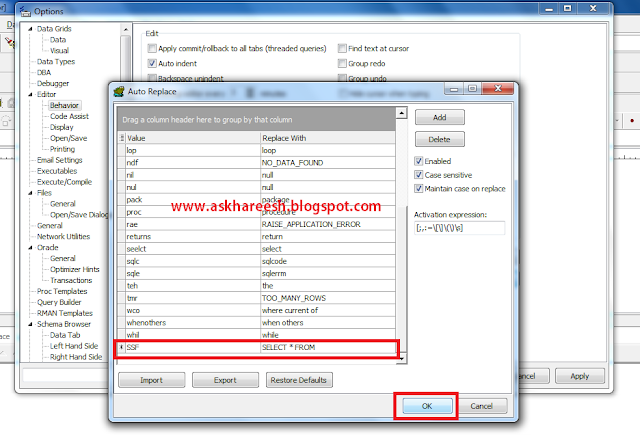
How to Setup Shortcuts in Toad, askhareesh blog for Oracle Apps
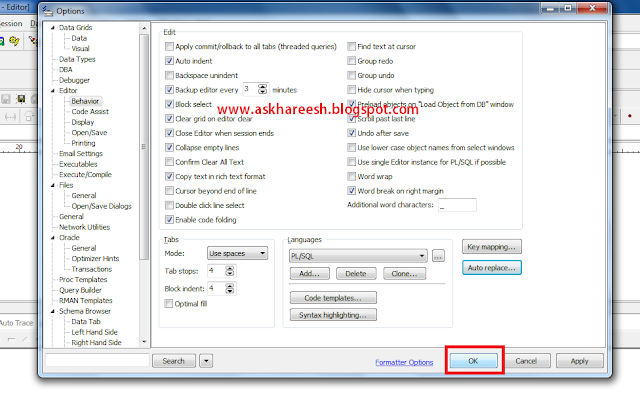
Click on Ok.

How to Setup Shortcuts in Toad, askhareesh blog for Oracle Apps
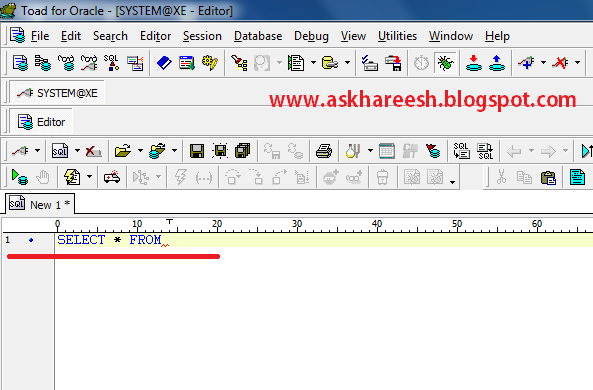
Adding shortcut to toad has been completed, now type ssf and press tab or space.

How to Setup Shortcuts in Toad, askhareesh blog for Oracle Apps

The ssf string will be replaced by select * from like below.
How to Setup Shortcuts in Toad, askhareesh blog for Oracle Apps


How to Setup Shortcuts in Toad

In Toad, We can setup shortcuts just like typing ssf instead of select * from. You can add shortcuts in toad as below.

Open Toad --> View --> Toad Options

How to Setup Shortcuts in Toad, askhareesh blog for Oracle Apps

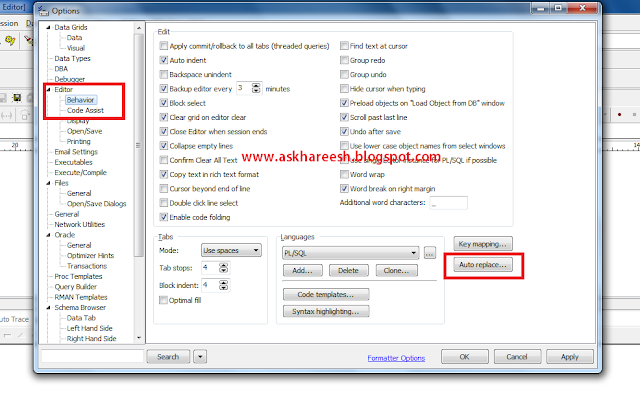
Editor --> Behavior --> Auto replace

How to Setup Shortcuts in Toad, askhareesh blog for Oracle Apps
Click on Add.

How to Setup Shortcuts in Toad, askhareesh blog for Oracle Apps